

Plan & Billing
Manage your plan, monitor usage, purchase credits, and view transaction history.
Overview
The Plan & Billing page (under Platform in the sidebar) has four tabs:
- Plan & Usage: your current plan tier, signal meters, and feature availability
- Credits: purchase signal and communications credit packs
- Usage: monthly usage history with daily activity breakdown, SMS/MMS vs voice cost split
- Transactions: purchase history for each wallet (credit purchases, plan allowances, refills)
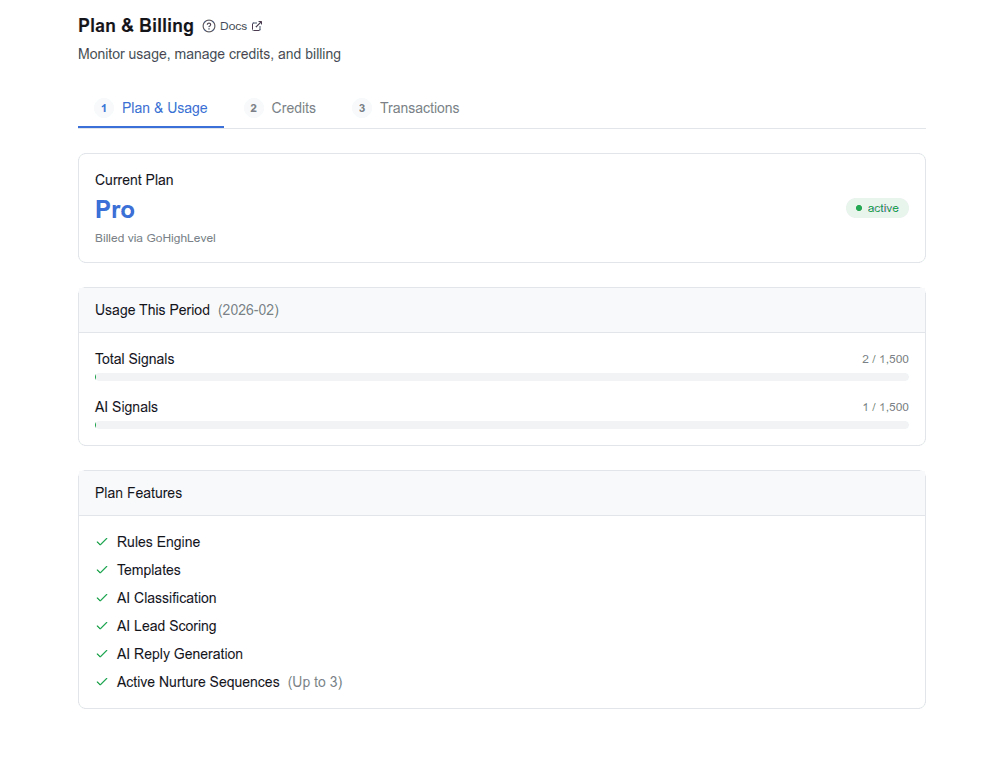
Plan tiers
| Feature | Core | Pro | Enterprise |
|---|---|---|---|
| Healthcare segment | $199/mo | $499/mo | $799/mo |
| Professional segment | $149/mo | $349/mo | $599/mo |
| Rules Engine | ✅ | ✅ | ✅ |
| Templates | ✅ | ✅ | ✅ |
| AI Classification | — | ✅ | ✅ |
| AI Lead Scoring | — | ✅ | ✅ |
| AI Reply Generation | — | ✅ | ✅ |
| Voice (WebRTC softphone) | ✅ | ✅ | ✅ |
| Mobile app | ✅ | ✅ | ✅ |
| Signals per month | 500 | 1,500 | 10,000 |
| AI Signals per month | — | 1,500 | 10,000 |
| Comms allowance | $15/mo | $60/mo | $100/mo |
| Phone numbers included | 0 | 0 | 0 |
Core is the rules-only tier. No AI features, but the full routing engine, templates, and business hours work. This is ideal for businesses that want deterministic automation without AI costs.
Pro adds AI classification, scoring, and reply generation. Most businesses start here.
Enterprise increases limits and adds advanced capabilities for multi-location businesses and agencies.
What's included in your plan
Every plan bundles a monthly allowance across a few things. Here's what each one means and how it's counted:
- Signals — every inbound event the pipeline processes: an incoming SMS/MMS, an email, a missed call, a form submission, or a custom webhook. Each event is one signal. Your plan includes a fixed number per month (see the table above).
- AI signals (Pro and Enterprise) — the subset of signals that use AI: intent and urgency classification, lead scoring, or reply generation. AI signals have their own monthly limit and are metered separately. See AI provider and costs.
- Comms allowance — a monthly dollar credit toward messaging and calls (SMS, MMS, and voice). Messages and calls draw this down as they're sent and received — see Communications credit usage rates for exactly what each one costs. When the allowance runs out, top up with a credit pack. A broadcast that hits an empty wallet mid-send pauses rather than failing—you add credits and resume it.
- Phone numbers — billed separately from the plan (see Phone number pricing). No numbers are included by default.
Quick answer — "How much is a text?" Messages are billed per part (segment), not per message, and MMS costs more than SMS. A plain one-part SMS runs $0.03–$0.05 depending on your tier; an MMS (with media) is $0.05–$0.07. Full breakdown in Communications credit usage rates.
Phone number pricing
Phone numbers are billed separately from your plan subscription:
- Local DID: $5/month
- Toll-free number: $15/month
Numbers are added per location as needed. See Phone number setup for details.
Pricing segments
Your pricing is determined by your industry segment, which is set during initial setup:
- Healthcare: medical spas, dental, clinical practices, and other healthcare businesses. Includes BAA availability for HIPAA compliance.
- Professional Services: legal, real estate, home services, and other professional businesses. Same features and limits at reduced rates.
Usage meters
Two meters track your consumption:
- Total Signals: every inbound event processed through the pipeline (SMS, email, webhook, etc.)
- AI Signals: signals that used AI features (classification, scoring, or reply generation)
Meters show:
- Current usage vs. plan limit
- Color-coded progress bar: green (< 70%), yellow (70–90%), red (> 90%)
Usage resets at the start of each billing period.
Trial period
New accounts start with a free trial of the Pro plan—14 days or 200 signals, whichever runs out first. It includes all Pro features:
- AI classification, scoring, and reply generation are fully available
- A usage banner at the top of the dashboard tracks both bounds: days remaining, and demo signals used against your allowance (200 unless your account was set up with a different one)
- The banner changes color as you approach the cap: default → caution (50%) → warning (75%) → error (100%)
- When the cap is reached, AI features are paused and a Start subscription button appears
- Click Start subscription to activate your paid plan immediately
See Manage your plan & billing for the full activation flow.
Usage enforcement
When you approach or exceed your plan limits:
- Soft cap (90%): warning indicator on the usage meter
- Hard cap (100%): AI features are disabled. The pipeline falls back to rules-only mode. Signals still flow and rules still match, but classification, scoring, and reply generation are skipped.
The pipeline never drops signals. It degrades gracefully by skipping AI stages when caps are hit.
AI provider and costs
AI features are powered by a cloud-hosted language model. Two modes:
- Platform-managed (default): Warpflow provides the AI. Cost is included in your plan subscription. Usage counts against your AI Signals limit.
- Bring Your Own Key (BYOK): you provide your own API key via Voice & Channels → Connections → AI Provider. You pay the AI provider directly. Usage still counts against your AI Signals limit for metering purposes.
The AI judge (Signal Guard) uses the same provider as reply generation. Judge calls are counted as part of the AI signal cost. There's no separate meter for Signal Guard evaluations.
Credits
Credits let you purchase additional capacity beyond your plan's included allowance. Two wallets:
Signals wallet (for additional signal processing capacity):
| Pack | Credits | Best for |
|---|---|---|
| Starter | 500 | Light overage buffer |
| Growth | 2,000 | Growing businesses |
| Scale | 10,000 | High-volume or seasonal spikes |
Communications wallet (for voice calls, SMS, and MMS, usage-based):
| Pack | Amount | Best for |
|---|---|---|
| Starter | $25 | Low call/SMS volume |
| Standard | $90 | Regular call and SMS usage |
| Volume | $250 | High call volume or campaigns |
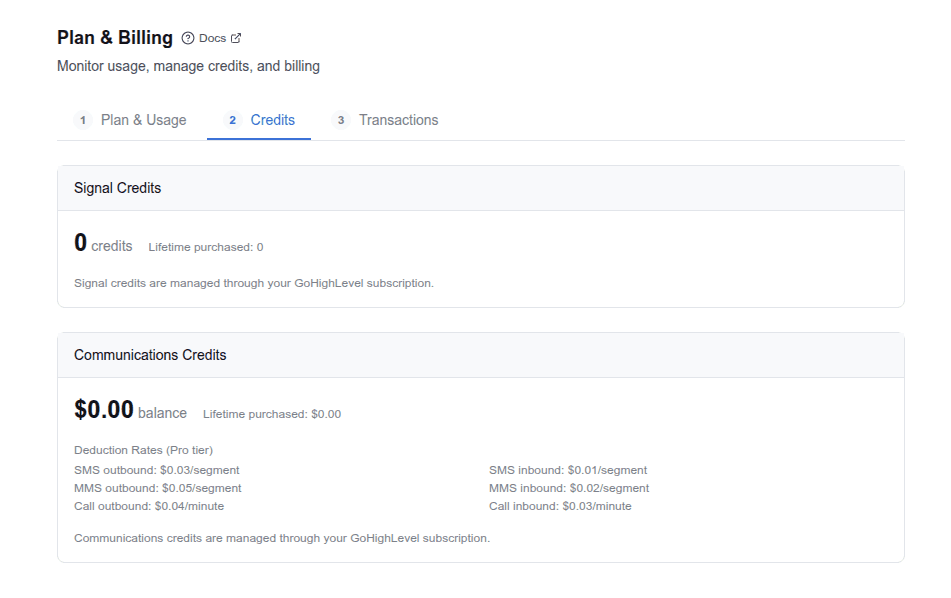
Purchase packs with one click. You're taken to a secure checkout to complete the purchase. Credits are added to your wallet immediately.
Comms credits — when to buy a pack
Your plan's monthly comms allowance covers your normal volume — but it resets each billing cycle and doesn't roll over, so a single busy month can run it down. That's what comms packs are for.
For example: say you're on Pro and normally send and receive ~1,500 messages a month, comfortably inside your allowance. This month you want to run a campaign that adds a few thousand extra messages on top. Buy a comms pack ahead of it so you don't run out mid-send. (Recipients per broadcast are capped per account — new accounts start at 25 — so a large campaign is several sends, not one; see Send a broadcast.)
Comms pack credits never expire. They sit in your Purchased balance and are used automatically once your monthly plan allowance is spent, so anything you don't use carries forward indefinitely — there's no risk in buying a pack a little early.
Communications credit usage rates
Your Communications wallet is usage-based: every message and call draws down credits as it's sent or received. The wallet is denominated in dollars, and each event deducts a small per-unit amount.
How messages are billed: per message part
Carriers don't bill per message — they bill per part (also called a segment). One text part holds:
- 160 characters of standard (GSM-7) text, or
- 70 characters when the message includes emoji or other Unicode
Longer messages are automatically split into multiple parts (about 153 GSM-7 characters per part once a message spans more than one, or 67 for Unicode), and each part is billed. A 300-character plain-text message sends as two parts and deducts twice the per-part rate. The composer shows a live part count as you type.
MMS — any message that includes media (an image, GIF, or vCard) — is billed at a higher per-part rate than plain SMS, reflecting the carrier cost of media messages. Attaching an image to a broadcast moves it from the SMS rate to the MMS rate.
Voice calls are billed per minute, rounded up to the next whole minute.
Rate table
Per-part (SMS/MMS) and per-minute (voice) rates by plan tier. Higher tiers pay less per unit:
| Event | Core | Pro | Enterprise |
|---|---|---|---|
| SMS outbound (per part) | $0.05 | $0.04 | $0.03 |
| SMS inbound (per part) | $0.03 | $0.03 | $0.02 |
| MMS outbound (per part) | $0.07 | $0.06 | $0.05 |
| MMS inbound (per part) | $0.06 | $0.05 | $0.05 |
| Voice outbound (per minute) | $0.05 | $0.04 | $0.03 |
| Voice inbound (per minute) | $0.05 | $0.04 | $0.03 |
Your dashboard's Credits tab shows the live rates for your current tier under Deduction Rates, so you always see exactly what each message or minute costs on your plan.
Example (Pro tier). A two-part SMS costs 2 × $0.04 = $0.08. The same message with an image (MMS) costs 2 × $0.06 = $0.12. A 3-minute outbound call costs 3 × $0.04 = $0.12.
Usage
The Usage tab shows your communication activity over the last 12 months:
- Monthly accordion: click any month to see a detailed breakdown
- Summary stats: total signals, SMS segments, and voice minutes per month
- SMS vs Voice split: percentage breakdown of your communications spend (MMS deductions are grouped with SMS)
- Daily activity: per-day deduction counts and costs when a month is expanded
Only the current month loads automatically. Older months load on demand when you expand them.
Transactions
The Transactions tab shows your purchase history for each wallet:
- Purchase: credit pack bought
- Plan allowance: monthly plan credits added at billing cycle start
- Refill: auto-refill or manual credit addition by admin
Each entry shows the date, type, amount, and running balance. Toggle between Signals and Comms wallets to see the relevant history.
Billing notifications
Signals sends push notifications for billing events so you're never caught off guard:
- Low balance: your credit wallet is running low
- Payment failed: a payment didn't go through
- Trial expiring: your free trial is ending soon
Billing alerts are on by default in Preferences → Notifications. See Manage notifications to adjust.
Billing portal
Click Open Billing Portal to access the billing portal where you can:
- Update your payment method
- View and download invoices
- Manage your subscription
Tips
- Monitor the AI Signals meter. If it's consistently near the limit, consider upgrading or switching to BYOK.
- Core tier is fully functional. You can route signals, send templates, and create tasks without any AI. Consider Core if your routing logic is simple and deterministic.
- Hard cap doesn't lose data. Signals are still processed and rules still fire. Only AI stages are skipped.
Signals for real estate
Set up Warpflow Signals for your real estate business with buyer qualification, open house follow-up, speed-to-lead routing, and price drop notifications.
Security & compliance
How Warpflow protects your data with encryption, access controls, audit logging, and infrastructure security.