

Industry presets
One-click configuration that loads routing rules, templates, brand voice, scoring weights, and Signal Guard rules tailored to your industry.
Overview
Industry presets are the fastest way to go from zero to a fully configured pipeline. Selecting a preset replaces your current routing rules, templates, and brand voice settings with industry-specific defaults. Scoring configuration is preserved.
Presets are a starting point. After applying one, you can customize every setting on the individual pages (Routing Rules, Templates, Brand Voice, etc.).
Available presets
| Preset | Rules | Templates | Tone | Signal Guard |
|---|---|---|---|---|
| General | 5 | 4 | Professional, friendly | Standard |
| Home Services | 6 | 5 | Friendly, casual | Standard |
| Consulting | 5 | 4 | Authoritative, professional | Standard |
| Real Estate | 6 | 5 | Warm, professional | Standard |
| Dental | 6 | 5 | Warm, empathetic | Compliance-enhanced |
| Automotive | 6 | 5 | Friendly, enthusiastic | Standard |
| Insurance | 6 | 5 | Professional, authoritative | Compliance-enhanced |
| Medical Aesthetics | 6 | 5 | Warm, professional, empathetic | Compliance-enhanced |
| Legal | 5 | 4 | Authoritative, professional | Compliance-enhanced |
| Financial | 5 | 4 | Professional, authoritative | Compliance-enhanced |
Compliance-enhanced presets (medical, insurance, legal, financial, dental) include:
- Industry-specific prohibited phrases and escalation keywords
- A default Signal Guard escalation rule that routes expert-knowledge requests to human review
- Stricter compliance principles for the AI judge
- Urgent keyword escalation (
rule_urgent_keyword): healthcare presets (Medical Aesthetics, Dental, Home Services) automatically escalate messages containing urgent medical or safety keywords (for example, "allergic reaction," "infection," "gas leak") to the appropriate team
What gets configured
When you apply a preset, the following are set:
- Industry identifier: used to load the correct Signal Guard preset and intent vocabulary
- Routing rules: pre-built rules for common scenarios (missed calls, after-hours, complaints, bookings)
- Templates: channel-specific message templates referenced by routing rules
- Brand voice: tone, persona (via recommended persona package), vocabulary, and signature
- Signal Guard preset: industry-specific prohibited phrases, escalation keywords, and compliance rules
What is not changed
- Scoring weights and tier thresholds: preserved so you don't lose custom tuning
- Business hours: your schedule is independent of industry
- Connections: integration settings are not affected
- AI provider: your API key configuration is preserved
Applying a preset
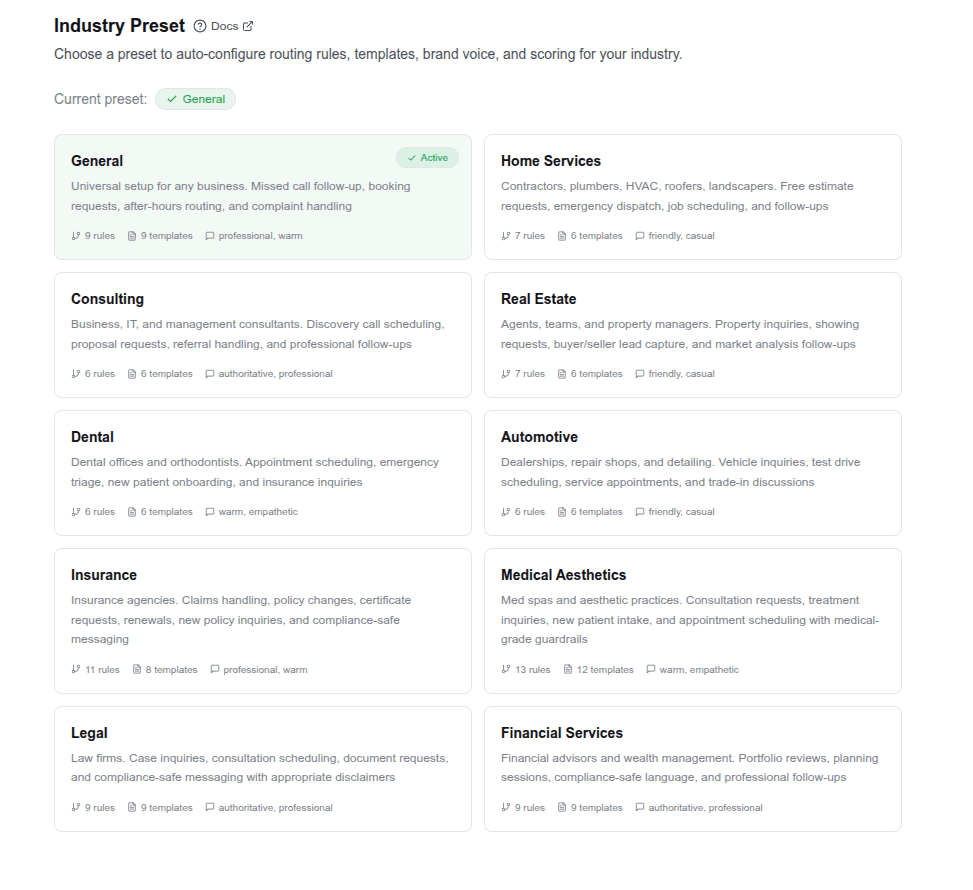
- Browse the preset cards on the Industry Preset page
- Click a preset to select it
- Click Apply. A confirmation dialog warns that rules, templates, and brand voice will be replaced.
- Click Yes, Apply Preset to confirm
- You'll be redirected to the Templates page with a banner confirming the preset was applied
Switching presets
You can switch presets at any time. The new preset fully replaces the previous one's rules, templates, and brand voice. If you've made custom modifications, they will be overwritten. There is no merge.
Tip: If you've heavily customized your configuration, consider exporting your current rules before switching presets.
Tips
- Apply a preset first, then customize. It's much faster than building from scratch.
- Compliance-sensitive industries should keep the default Signal Guard escalation rule. It's there for a reason.
- The General preset works for any business. Use it if your industry isn't listed, then customize the intent vocabulary and templates.
- After applying a preset, visit each settings page to review what was configured and make adjustments.