

Brand voice
Controls the tone, personality, and vocabulary of all AI-generated replies.
Overview
Brand Voice defines how your AI replies sound to customers. Every AI-generated message, whether auto-sent or queued for approval, is shaped by these settings. Brand voice controls:
- AI replies: your tone and personality are built into every AI-generated response
- Vocabulary enforcement: preferred and prohibited words guide what the AI says and avoids
- Signal Guard integration: prohibited words are also checked by Signal Guard, so flagged replies get caught automatically
Layout
Brand Voice is organized into two horizontal tabs:
- Voice Identity: persona picker and tone selection
- Content Rules: preferred and prohibited vocabulary, message signature
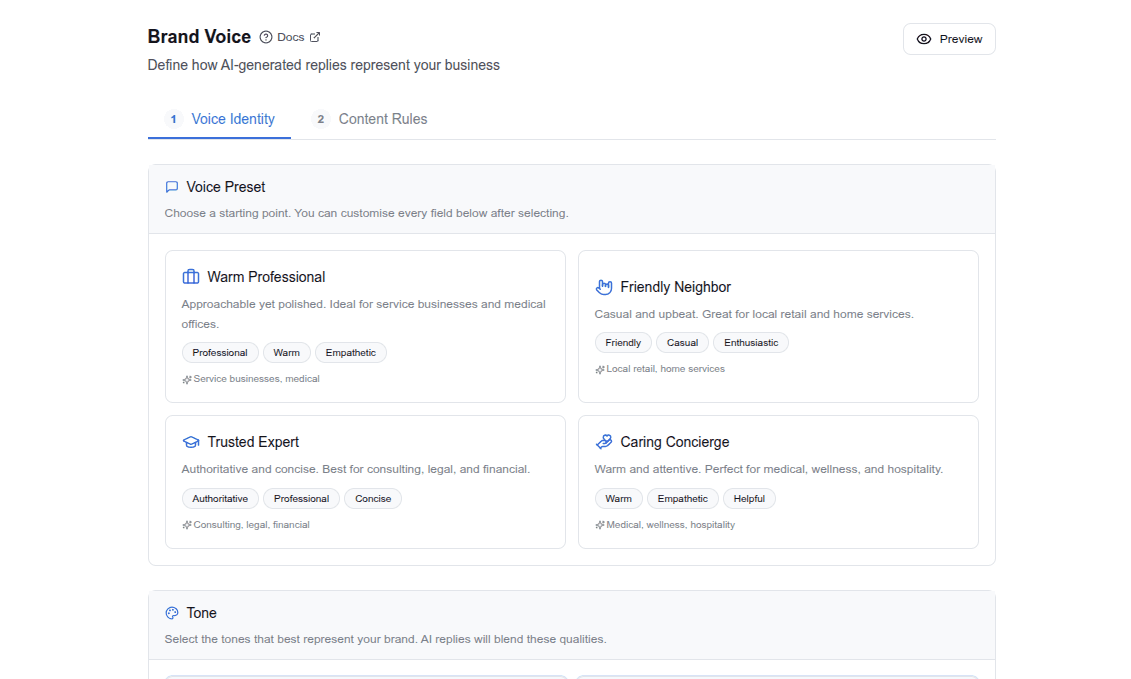
Changes on both tabs save automatically (there's no Save button).
Voice Identity tab
Persona picker
The fastest way to configure brand voice is to select a persona. Each persona bundles tone and vocabulary into a cohesive identity.
| Persona | Tone | Best For |
|---|---|---|
| Warm Professional | Professional, warm, empathetic | Service businesses, medical |
| Friendly Neighbor | Friendly, casual, enthusiastic | Local retail, home services |
| Trusted Expert | Authoritative, professional, concise | Consulting, legal, financial |
| Caring Concierge | Warm, empathetic, helpful | Medical, wellness, hospitality |
Selecting a persona pre-fills all fields below. You can then customize any field. The persona is a starting point, not a constraint.
When you apply an industry preset (for example, "Dental" or "Insurance"), the recommended persona for that industry is automatically selected.
Tone
Select one or more tone keywords that describe how replies should sound. Available tones:
- Professional: polished and business-appropriate
- Friendly: approachable and warm
- Casual: relaxed and conversational
- Formal: structured and traditional
- Empathetic: understanding and supportive
- Authoritative: confident and knowledgeable
- Warm: caring and personable
- Concise: brief and to-the-point
- Enthusiastic: energetic and excited
- Technical: precise and detail-oriented
Multiple tones can be combined (for example, "professional" + "warm" + "empathetic").
Content Rules tab
Vocabulary
- Preferred words: terms the AI should favor (for example, "consultation," "appointment," "wellness")
- Prohibited words: terms the AI must avoid (for example, "cheap," "discount," "guarantee")
Prohibited vocabulary words also feed into Signal Guard enforcement. If the AI generates a reply containing a prohibited word, it will be flagged.
Message Signature
The sign-off appended to outbound messages. Per-channel toggles let you enable or disable the signature independently for SMS and Email.
- SMS signature: useful for short sign-offs like a business name or phone number
- Email signature: supports longer formatting with contact details and links
HIPAA-enabled tenants only see the SMS toggle, since email is hidden for HIPAA tenants.
How brand voice fits into message processing
When an AI reply is generated, your brand voice settings are automatically applied:
- Customer message arrives and is classified
- Routing rules determine what action to take
- If the action is "generate reply," brand voice kicks in—your tone, persona, and vocabulary guide the AI's response
- The AI also respects channel limits (SMS replies are shorter than email)
- Signal Guard checks the reply for prohibited words and compliance
- The reply is either auto-sent or queued for your review
Tips
- Start with a persona, then customize. Don't try to configure everything from scratch.
- Keep prohibited words short and specific. "discount" is better than "we don't offer discounts." The AI understands the constraint from a single word.
- Test with the Test Runner after changing brand voice to see how replies change.
- SMS replies are shorter: the AI respects channel constraints (default 480 characters for SMS). Verbose tones like "enthusiastic" may get truncated on SMS.
- Changes save automatically. Switching tabs, editing fields, or selecting a persona persists immediately.