

What's new
The latest improvements to Signals, and what they let you do.
New capabilities land in Signals regularly. Most of them are things you asked for that now simply work—so here's what changed, framed by what you can do with it, with a link to the full guide for each.
October 2026—Billing that counts the AI receptionist
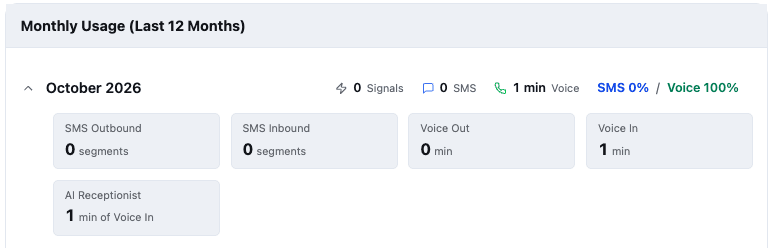
See your AI receptionist's minutes
If your account uses the AI receptionist, Billing → Usage and Credits now show the minutes it spent on calls and the rate they were billed at, alongside your other usage.
→ Full guide: Manage billing
Command Center days end at your midnight
The Command Center's "today" and "yesterday" now roll over at midnight in your business's own timezone, and its counts match what's in the Work Queue.
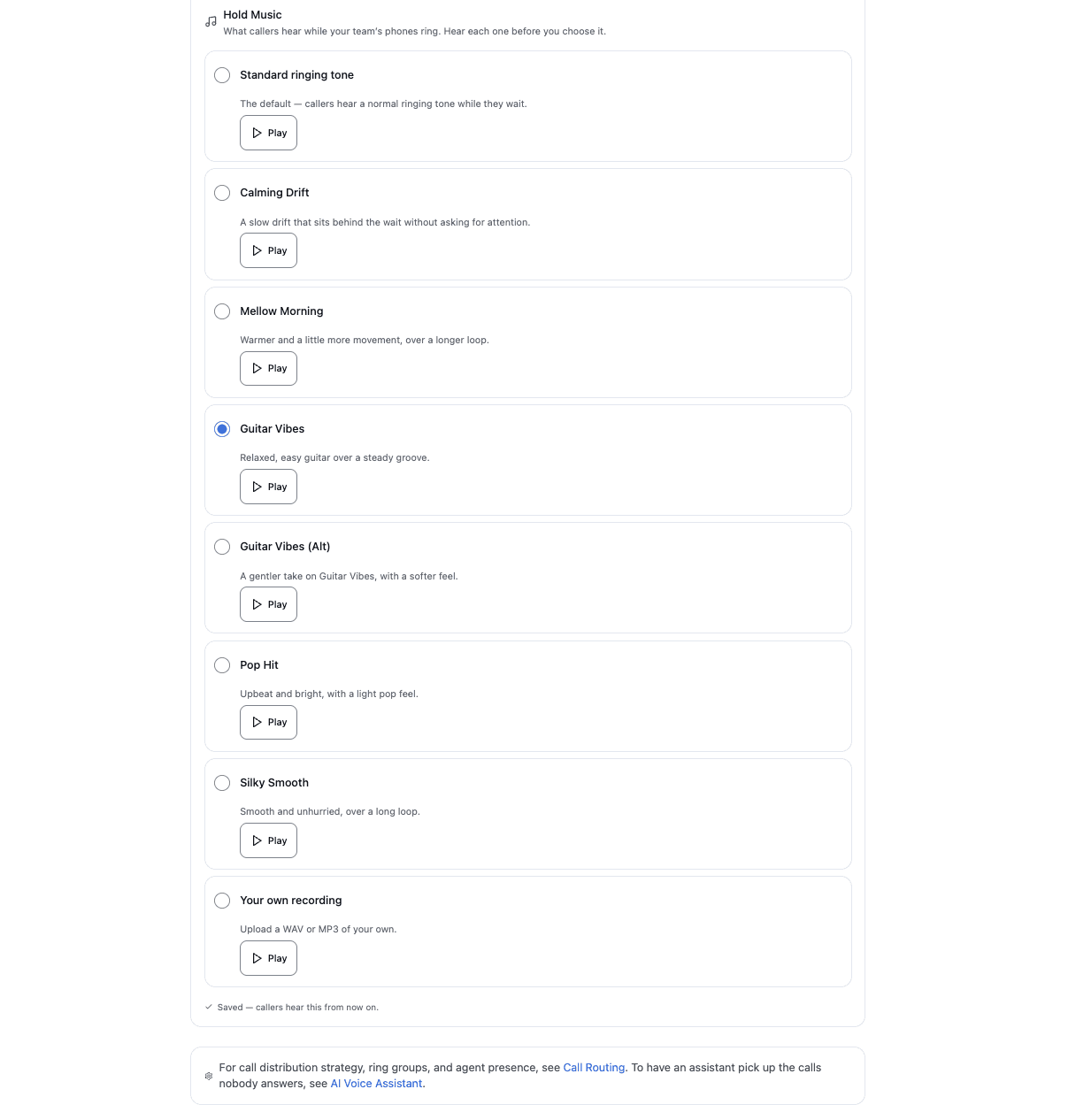
Choose from six hold-music tracks
Callers on hold can now hear one of six tracks: Calming Drift, Mellow Morning, Guitar Vibes, Guitar Vibes (Alt), Pop Hit and Silky Smooth. Every track is mastered for the phone line, so it sounds clear rather than muffled. Choose one under Phone Setup → Call Handling → Hold music, and press Play to hear it before your callers do.
→ Full guide: Voice calls › Hold music
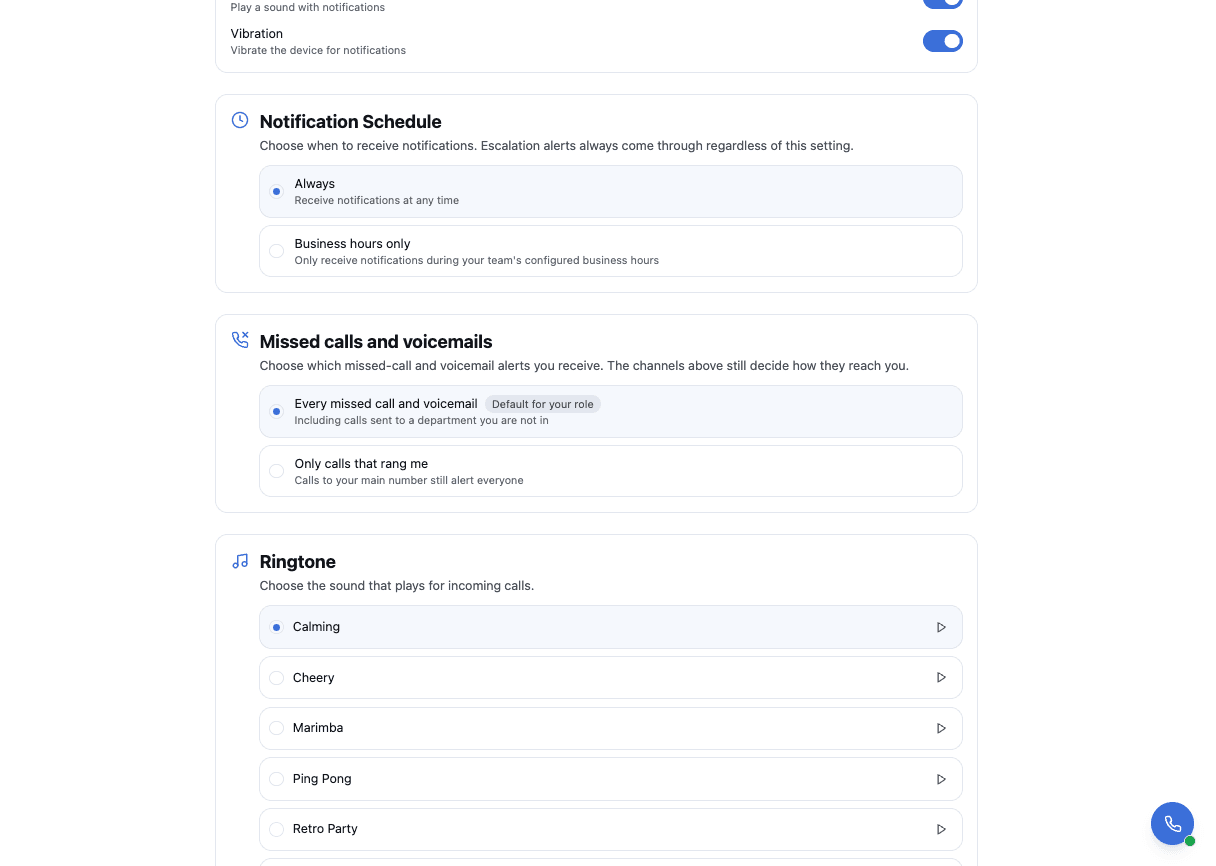
Missed-call alerts go to the people who were rung
This only matters if you use departments or transfer callers to a colleague. When a call sent to a department goes unanswered, the missed-call or voicemail alert now goes to the people whose phones rang, plus admins and managers. Calls to your main number still alert everyone, as before. Admins and managers can choose Only calls that rang me under Notifications → Missed calls and voicemails.
→ Full guide: Manage notifications
Both halves of a call your AI receptionist handed over
If your account uses the AI receptionist, a call it hands to someone on your team now shows as two parts in Call History: the assistant's, then your team member's. Each one plays on its own. With call transcription turned on (it's off by default), the part your team member handled is transcribed too. Billing → Usage now also counts the minutes your AI receptionist handled.
→ Full guide: Voice calls › Call history
Also in this release
- The Work Queue loads every task, with a Load more button instead of a 50-task limit.
- Admins setting up the phone will find Call Routing and the AI Voice Assistant inside Phone Setup too. They're still in the main menu.
- Pages show the shape of their content while they load, instead of a spinner.
September 2026—Calls reach the right desk, and you can see what rings you
Signals can now route a call to a named team rather than to everybody, an agent can send a caller to one mid-call, and every agent can see for themselves which lines they answer. Later in the month, everything a caller hears—the greetings, the voice saying them, and the music while they wait—became something you can listen to, change, and record for yourself. And at the end of it, your current specials became something you write down once and have recited—on your voicemail, to callers on hold, and in your after-hours texts.
Send a caller to Billing, not to everybody
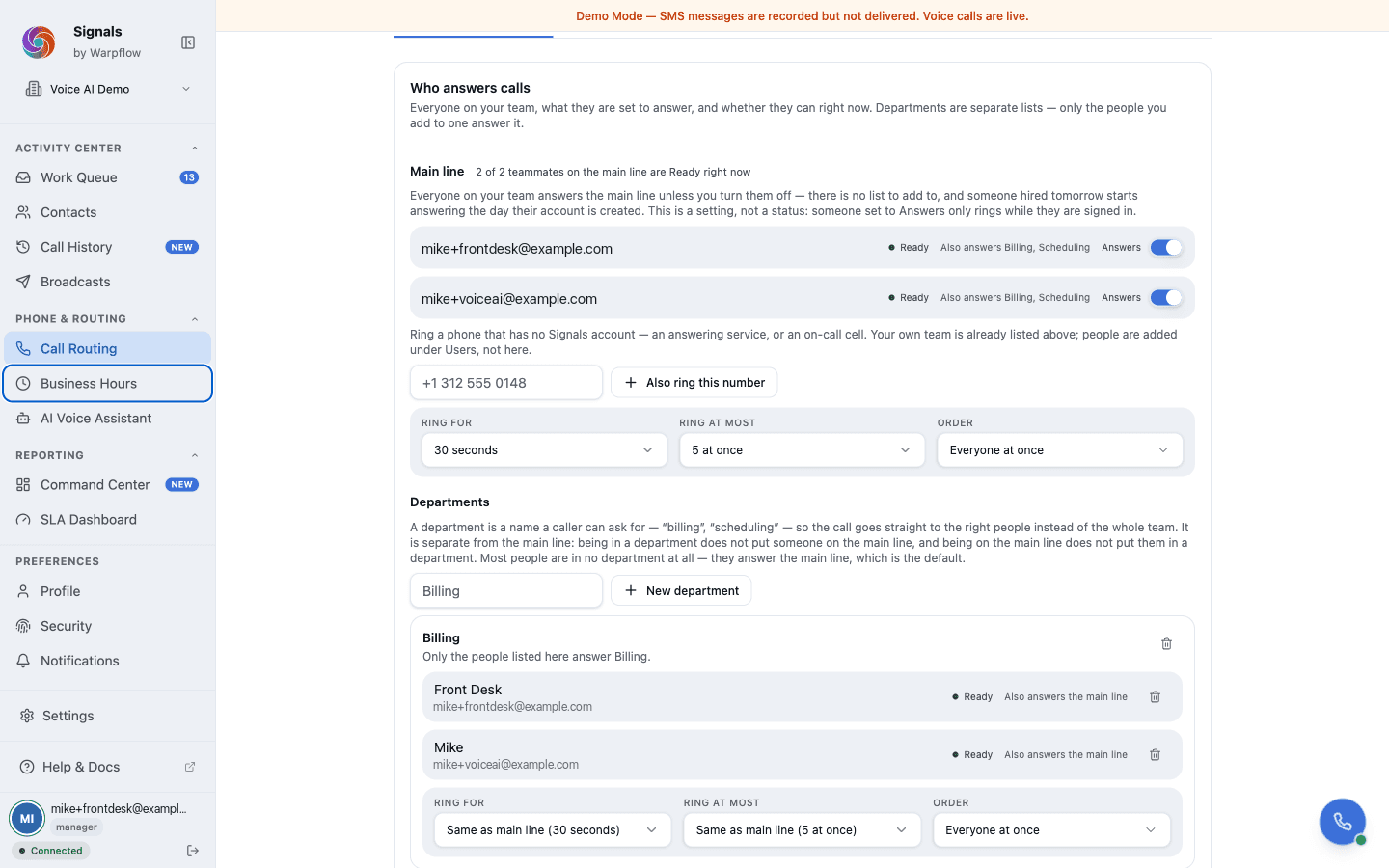
Until now a call to your number rang one list of people. You can now create departments—named lists like Billing, Scheduling or Front Desk, up to twenty—each with its own members and its own ring settings. A department inherits the main line's ring timeout and rotation until you change them, so you only set what differs.
Being in a department does not put someone on the main line, and being on the main line does not put them in a department. That separation is the point: it is what lets a call to Billing ring Billing and nobody else.
Departments are set up by a manager or an admin on Phone & Routing → Call Routing. The same page has been rebuilt around one Who answers calls list, where each person's row shows both what they are set to answer and whether they can take a call right now—rather than a routing panel in one place and a presence readout two scroll-lengths away.
→ Full guide: Voice calls
Transfer a caller to a department yourself
If your account has departments, the softphone's Transfer panel lists them as buttons. Any agent can send a caller to Billing without asking a manager and without typing anything. A department with nobody in it is marked, so you do not hand a caller to silence.
Transferring to a colleague now rings every device that person is signed in on, rather than whichever one happened to answer first.
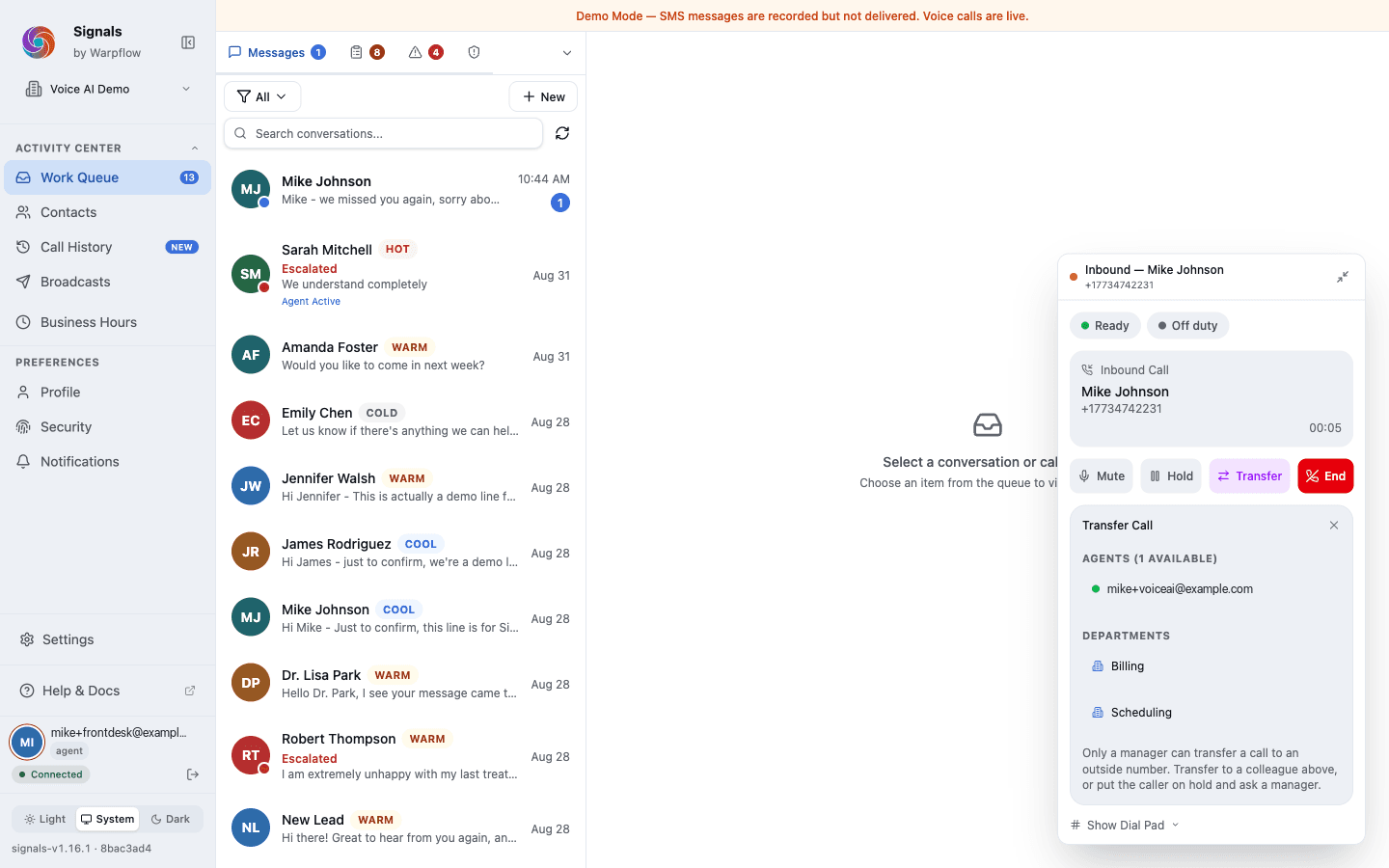
→ Full guide: Use the softphone
See what rings you, and why
Settings → Profile has a new card, What rings you: the main line and every department, each saying whether you answer it, and if not, why not. It is the fastest answer to "that call should have come to me," and you do not need a manager to read it.
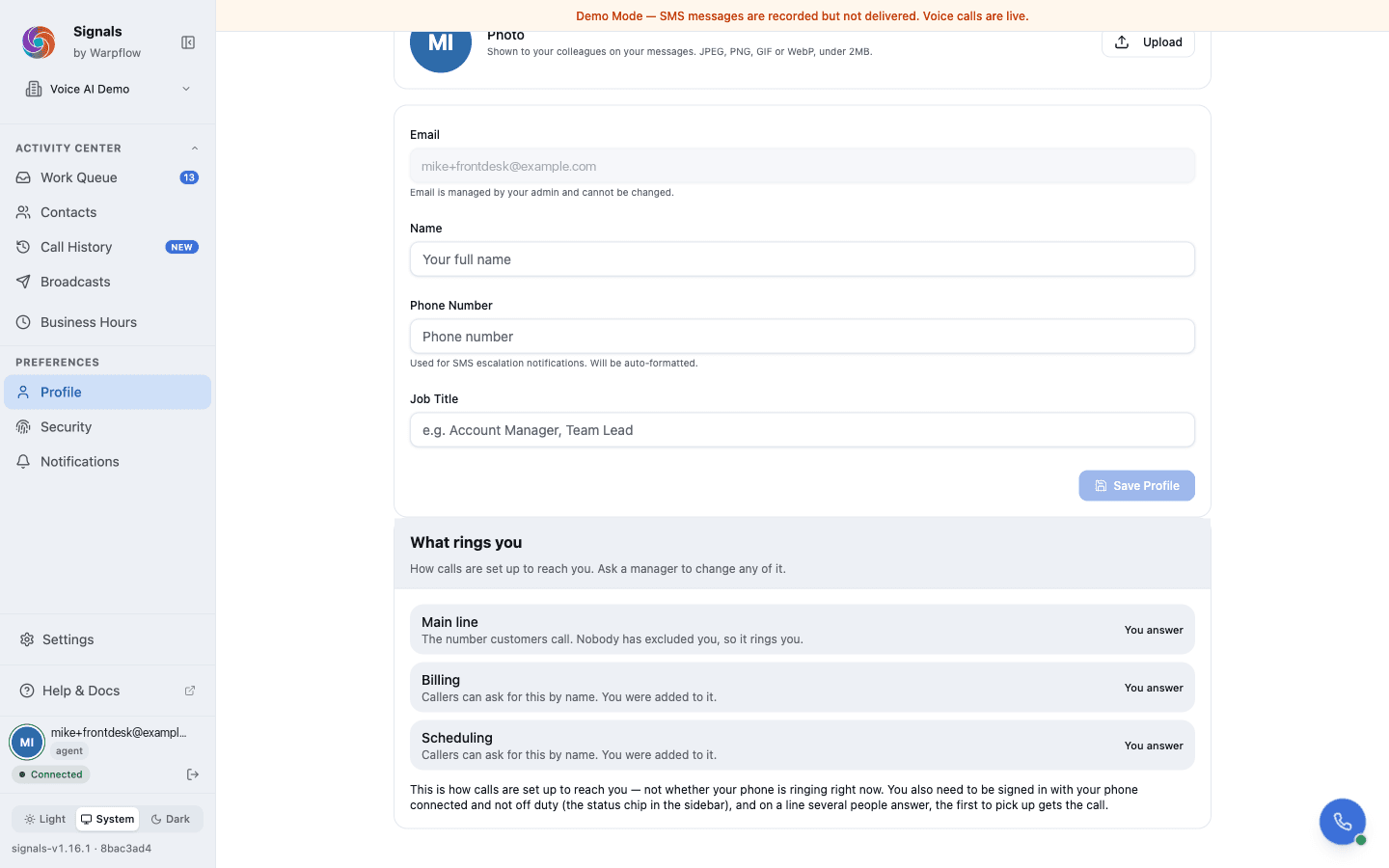
It tells you how calls are set up to reach you—not whether your phone is ringing this second. You still need to be signed in with your phone connected and not off duty, and on a line several people answer, the first to pick up gets the call.
One set of words for who is on the floor
Availability reads the same everywhere in Signals: Ready, On a call, Wrapping up, Off duty, and Not signed in.
You choose Ready and Off duty. Signals sets On a call and Wrapping up as calls come and go—they were never really yours to pick.
Off duty and Not signed in mean different things: off duty is a choice you made, and not signed in means Signals found no active session.
Managers can see the Command Center
Reporting was admin-only. If you manage a floor—setting who answers, the rotation and the timeouts—you can now open Command Center and SLA Dashboard and see how any of it performed, without an admin having to pull the numbers for you.
Your screen locks after 5 minutes of inactivity
Step away and Signals locks after five minutes. Your session stays alive—unlock with your passkey or PIN and pick up exactly where you left off, without signing back in.
A ringing call is still answerable from the lock screen, so you never miss one because the screen locked.
Hear a greeting before a caller does
Every greeting now has a play button beside it. Press it and you hear exactly what a caller hears, in the voice that will say it—the welcome message, the recording notice, the after-hours and holiday messages, and the voicemail prompt.
If a greeting still uses one of the older generic voices, pick a newer one to hear it played back.
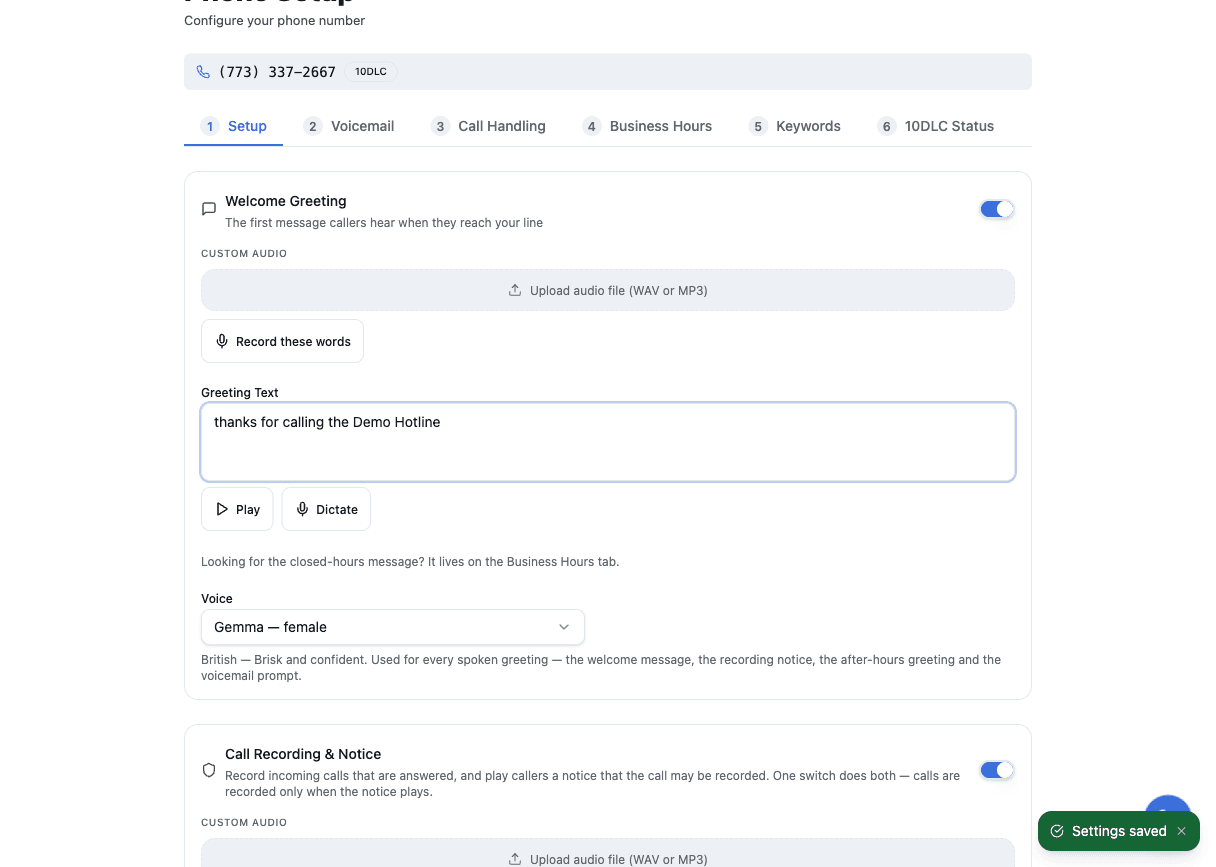
The voice you pick is the voice a caller gets
Choosing a greeting voice used to come down to the same two generic voices whichever name you picked. Now the voice you choose is the one a caller hears. If your greeting voice is different from your assistant's, Signals says so on the page rather than leaving a caller to notice it mid-call.
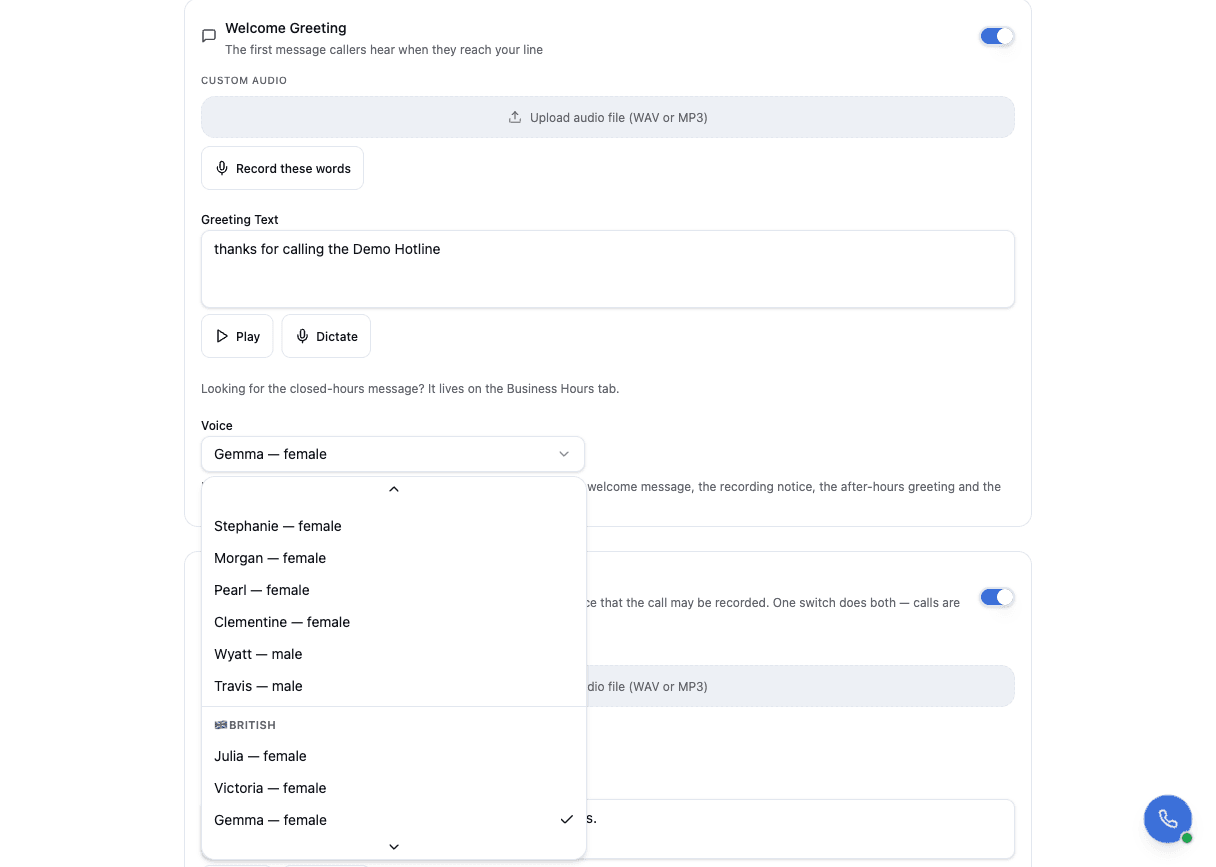
See where each greeting is heard
Phone & Routing draws your call flow as a diagram: where a call goes, and which greeting plays at each point. Click any greeting in it to hear it, or to jump straight to the setting that changes it.
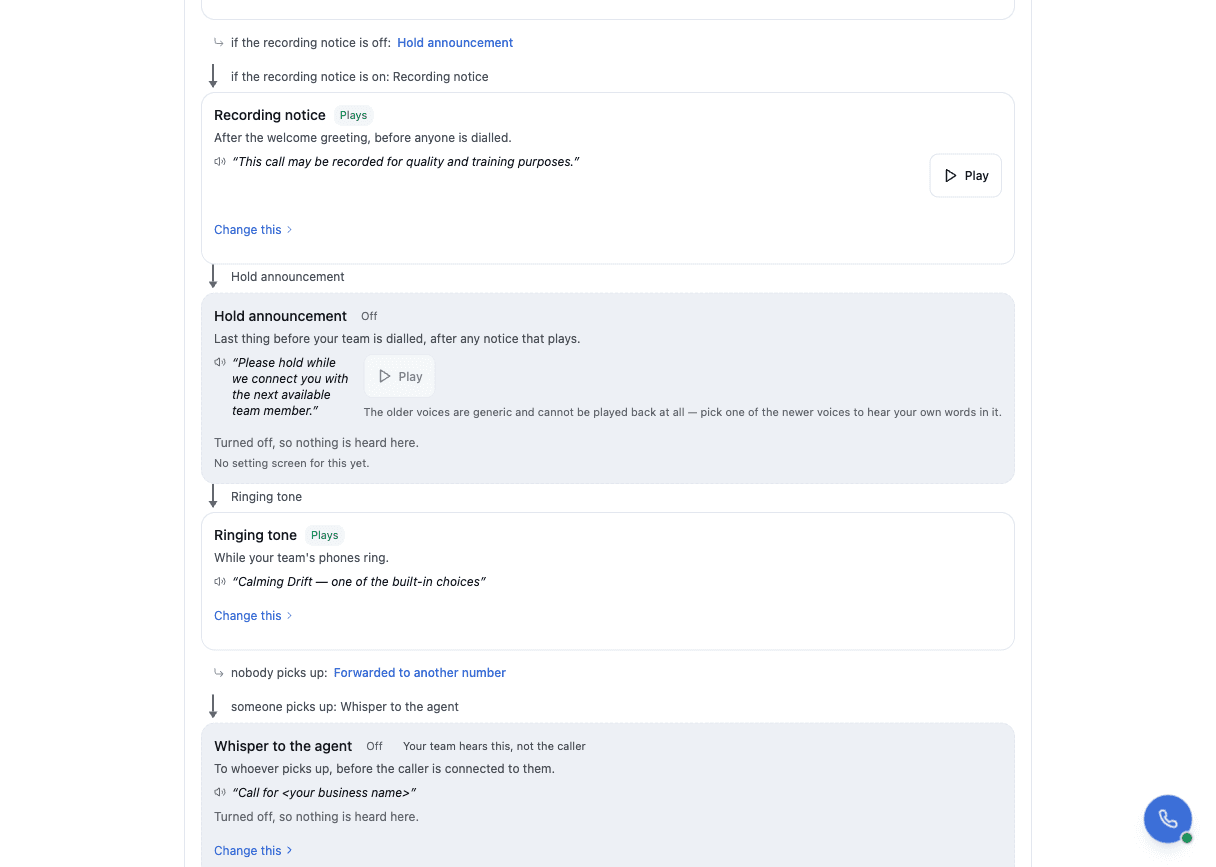
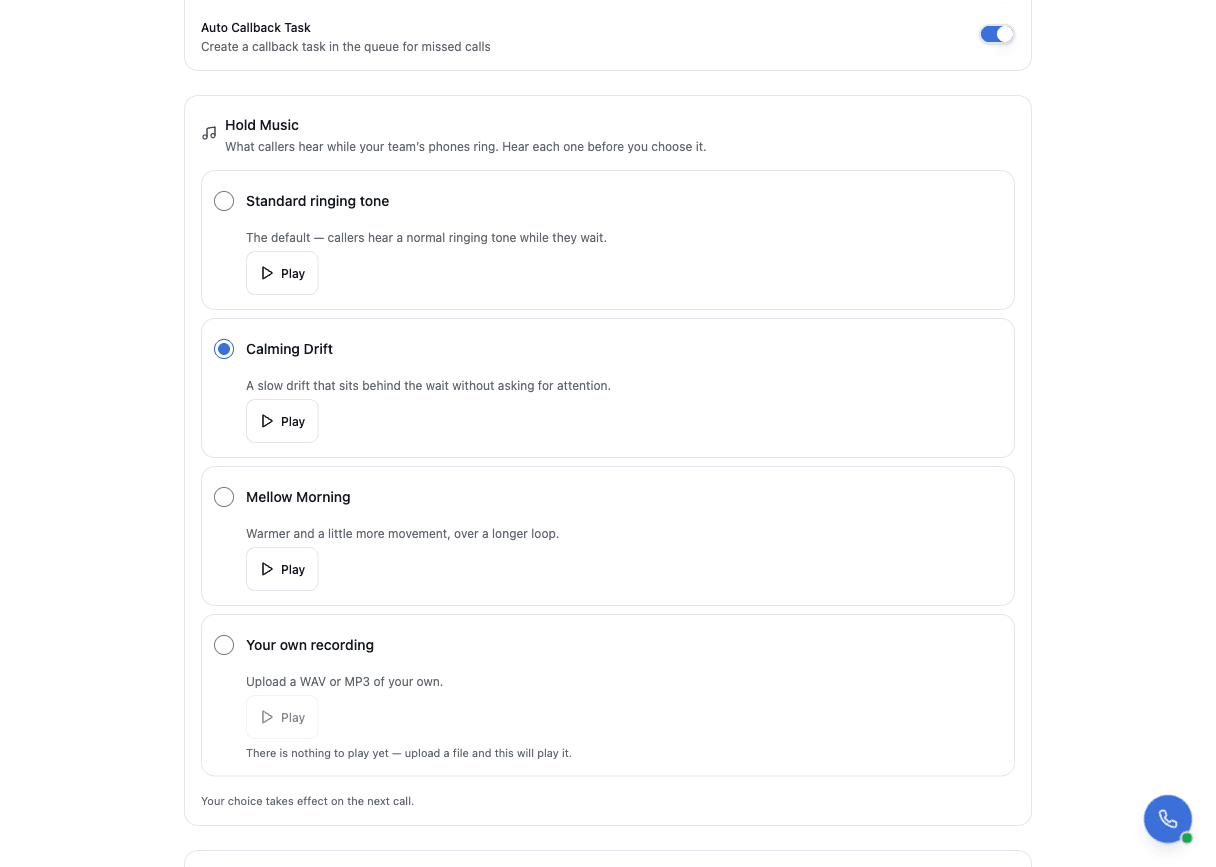
Choose what a caller hears while they wait
Hold music is yours to pick: the standard ringing tone, one of two stock tracks—Calming Drift or Mellow Morning—or your own file. You can listen to each one before you choose.
Record a greeting once, and every caller hears that exact recording
Rather than having a greeting read out afresh on every call, you can record it once and have that recording play every time. It is available for the welcome message, the recording notice, after-hours, holiday and voicemail.
Change the wording or the voice afterwards and Signals goes back to reading it live until you record it again—so a caller never hears a recording that no longer matches what you wrote.
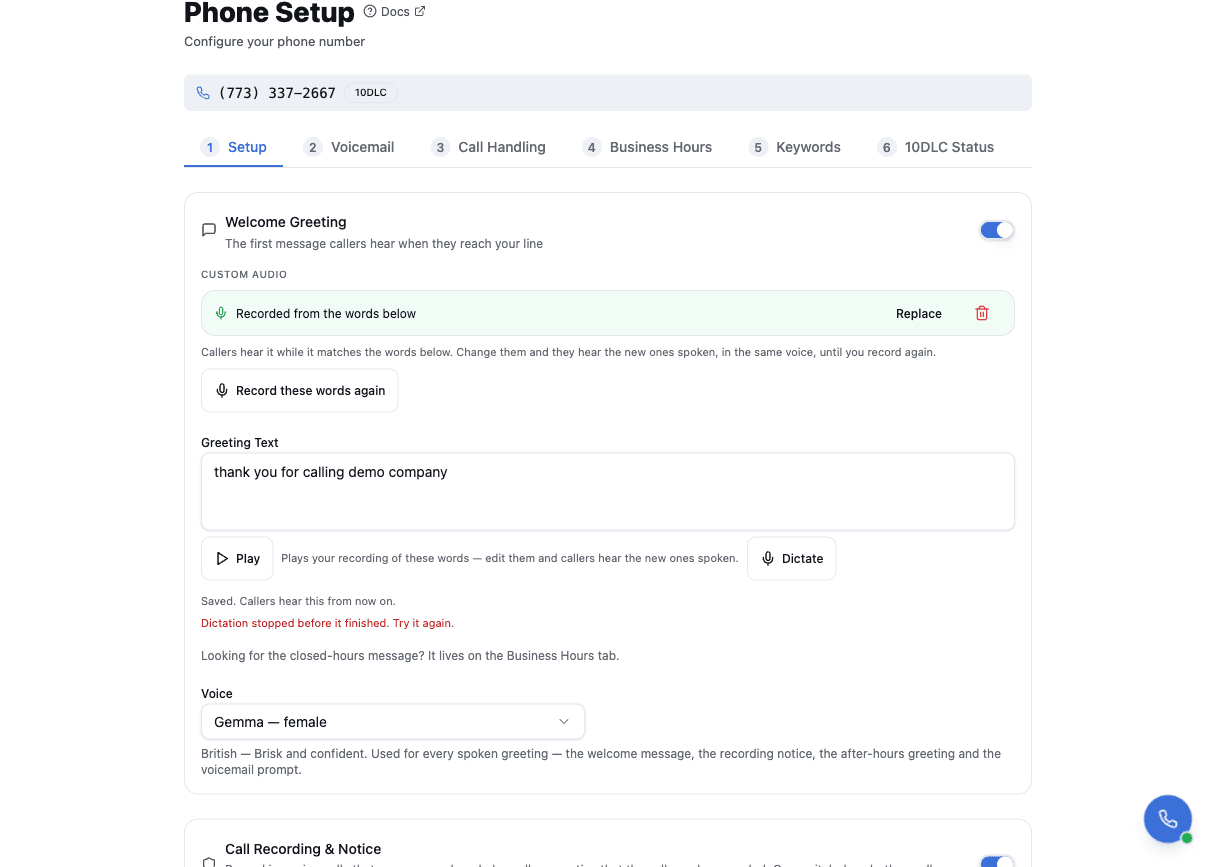
Speak a greeting instead of typing it
Beside each greeting there is a Dictate button: say it out loud and the words appear as you speak.
It needs Chrome or Edge on a computer—it is not in the mobile app—and it is not available on healthcare, dental or medical-aesthetics accounts, or any account set to the strictest privacy handling.
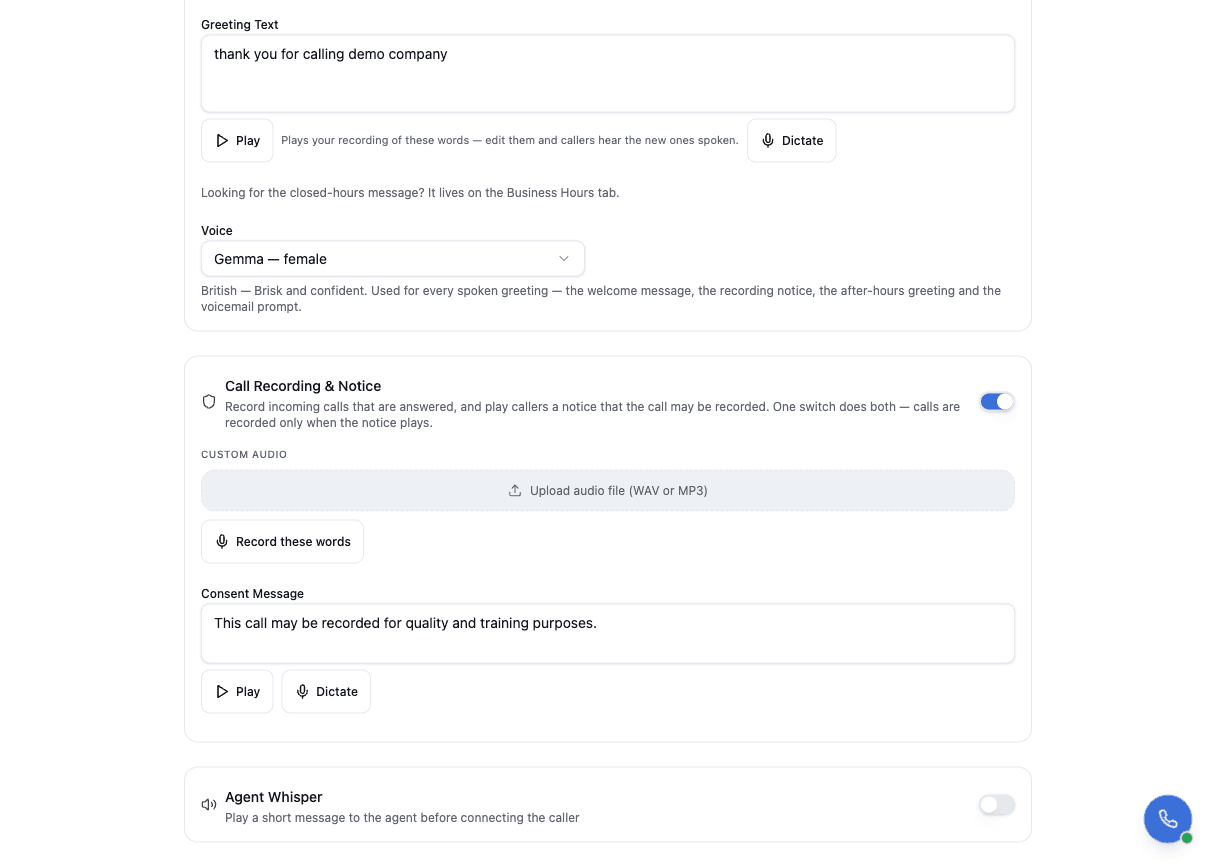
Recording a call and telling the caller are one switch
The call-recording control now says what it does: turning it on records answered calls and plays the notice that tells callers so. There is no setting in which a call is recorded without the caller being told. A voicemail message is recorded either way.
→ Full guide: Voice calls
Keep your current specials in one place
Your promotions used to live wherever you had last typed them—in the welcome message, in a template, in someone's head. Business Profile → Offers is now the one place they live. Write each one once, give it a start and stop date, and Signals shows whether it is Scheduled, Live or Ended.
An offer outside its dates is never read aloud, so a February special cannot resurface in June.
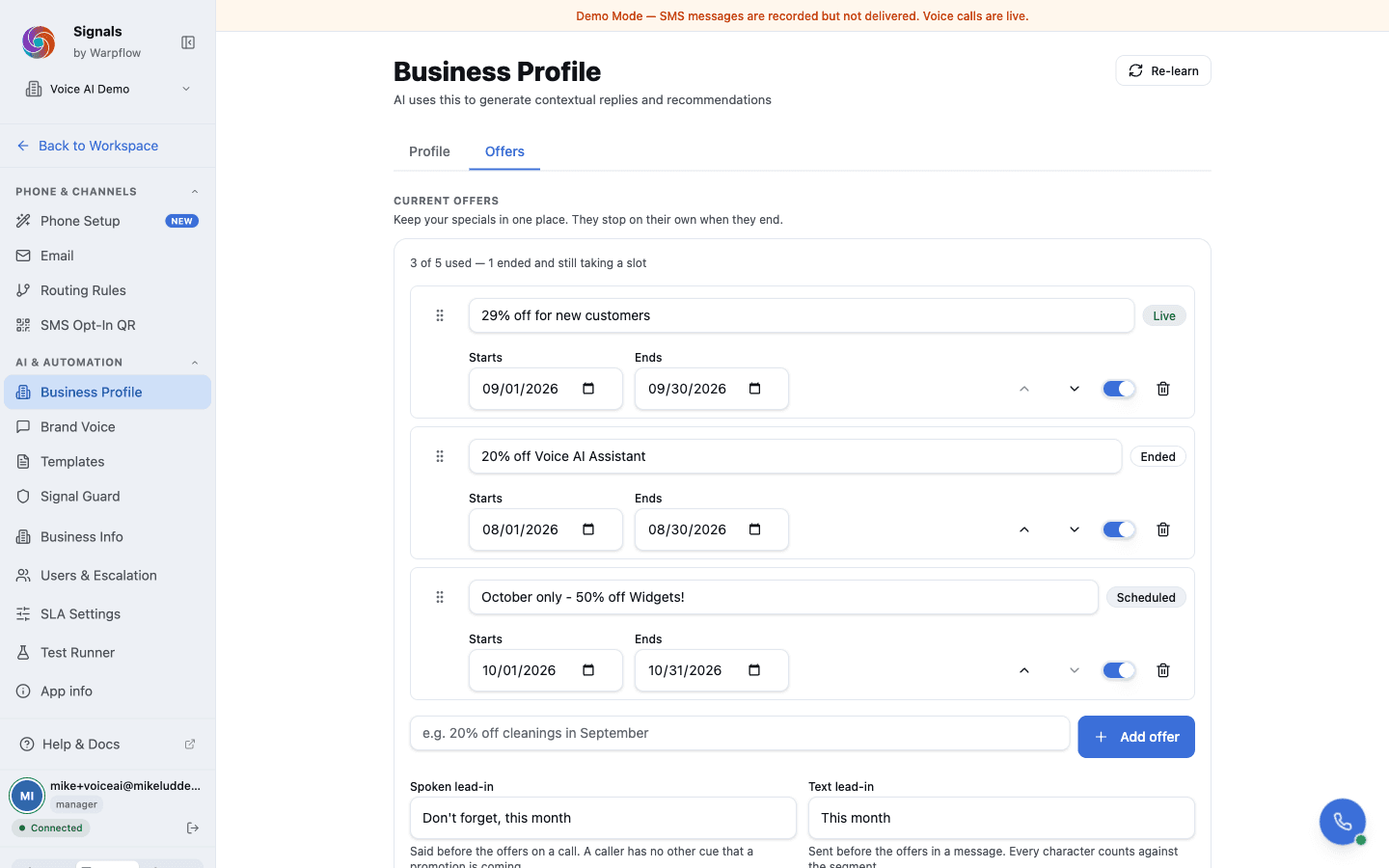
→ Full guide: Manage offers
Callers who reach voicemail hear what is on
Turn on Read out current offers under Phone Setup → Voicemail and your voicemail greeting is followed by your live specials, in the same voice. Your recorded or written greeting is untouched—the offers are spoken after it, so you never re-record a greeting to change a special.
The same switch is on the hold announcement, for callers who wait rather than leave a message.
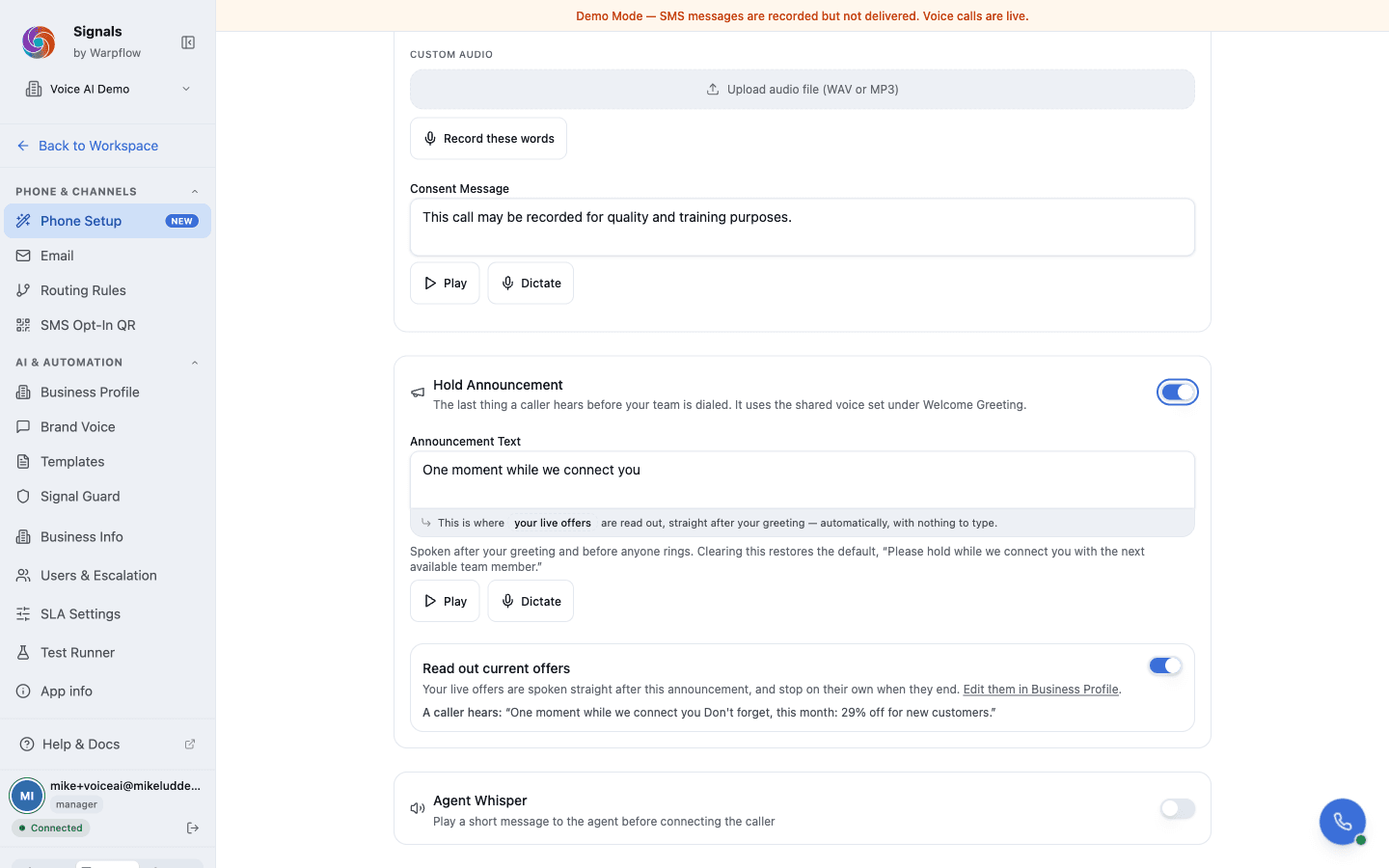
Both are off until you turn them on, and both say nothing at all when no offer is live.
Your texts can carry them too
Add {{offers.current}} to your after-hours auto-reply on Message Studio → Templates and the text a caller gets after hours names what is on. The editor previews the finished message, so you can see its length before anyone receives it.
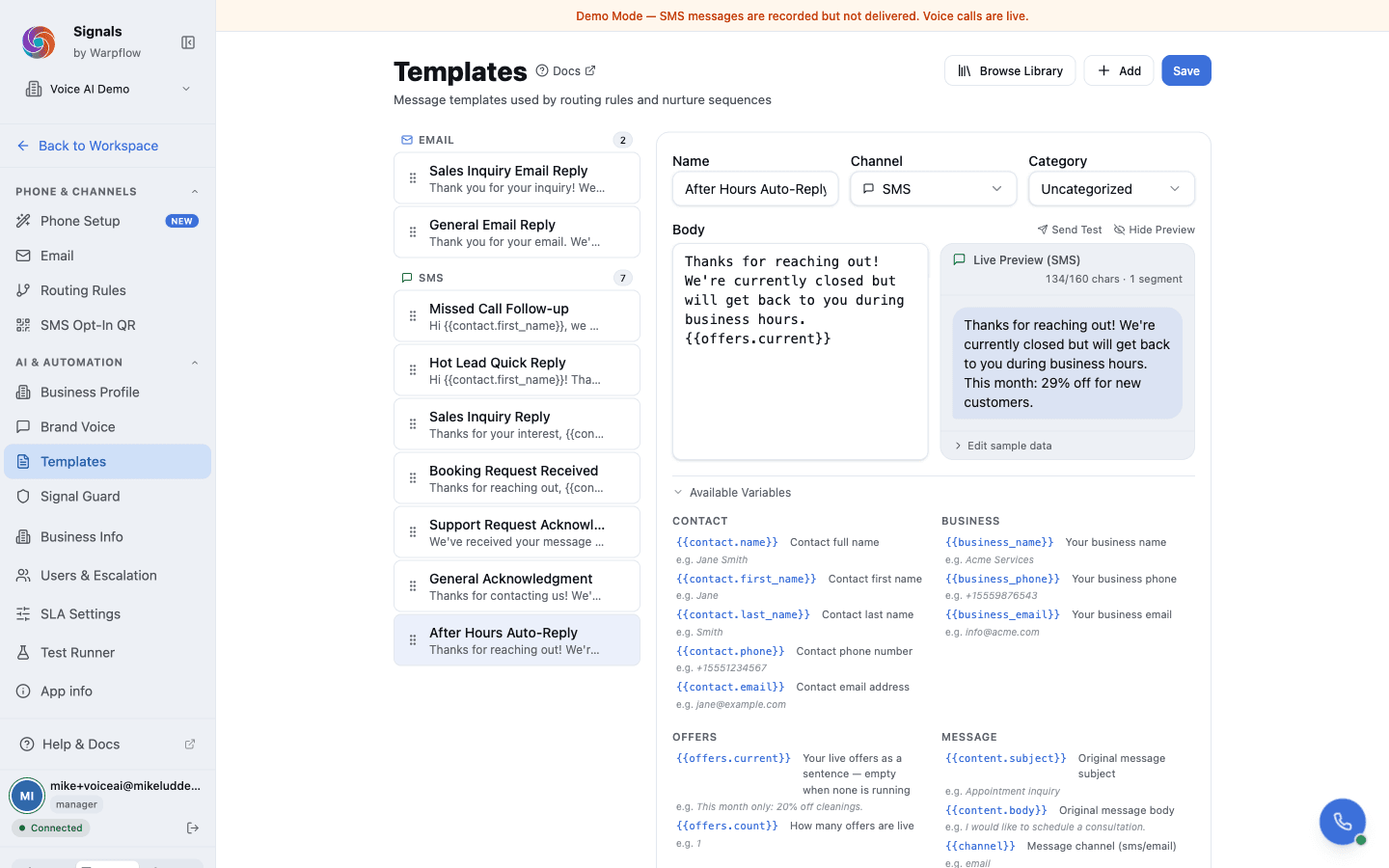
If your account uses AI-written replies, a customer who asks about specials now gets an answer that cites your live offers rather than deflecting to your business hours. It mentions them only when the customer's question makes them relevant.
Fixed in this release
- Transferring a call to a named colleague now connects, and rings every device that person is signed in on.
- The softphone keeps receiving calls after a network blip, and the connection badge reflects the real state of your connection.
- An outside phone number in your ring group rings, alongside your team—useful if you use an answering service or an on-call cell as a backstop.
- The ring timeout you set is the one calls use.
- Everyone in a ring group takes their turn, including the sixth person and beyond, on accounts large enough to have one.
- A greeting you upload plays on the slot you uploaded it to, and replacing one clears out the file it replaced.
- The intro greeting plays whether or not the recording notice is switched on.
- Managers can upload greeting audio, rather than being refused on a page that offered it.
- The Who answers calls page leads with the controls, so a long list of departments no longer pushes them off the screen.
- Business hours now know about your holidays. An AI-written reply used to quote your weekly hours even on a day you had marked closed. Holiday overrides are now read everywhere hours are evaluated—in replies, in the after-hours decision, and in what the assistant says on a call.
- Your message signature is a switch. It had to be blanked out to turn it off; it is now an explicit toggle on Brand Voice.
- The Connected badge now means you can actually be rung. Someone signed in on the phone app alone no longer shows as reachable in the browser; a connection that has degraded shows as degraded instead of green; and the badge no longer goes quietly stale while a shift runs.
- Signing out takes you off the phones. An explicit sign-out releases your browser calling line right away, and only a fresh sign-in gets a new one. When a manager removes or disables someone, that person's browser phone stops as well, including from a tab that was already open.
- Managers can see when a removal did not finish. If releasing a former team member's calling line fails, Admin Users now says so and offers Retry cleanup, instead of leaving it to be discovered later.
- A call event that arrives twice is handled once. A duplicate delivery from the carrier no longer creates a second record or a second action.
- Security hardening across sign-in and the API. Sign-in from an embedded page now requires your normal credentials, repeated failed sign-in attempts from one source are throttled before they reach your account, and the API only accepts traffic through our edge network.
Your holidays, handled once
Business Hours now carries a US holiday calendar. Press Add from holiday calendar, tick the days you close—the nine most practices observe are pre-ticked—and Signals writes the dates in for you. Holidays that move, like Thanksgiving and Memorial Day, land on the right day every year without anyone updating them. Christmas and the Fourth stay put.
Each date is still yours to edit: shorten Christmas Eve to a half day, or remove a holiday you stay open for, and the calendar leaves your change alone. The only thing you ever have to do is take one off the list.
Callers on a holiday hear your holiday greeting, after-hours texts tell them you're closed, and the AI reply knows the day too. A manager or administrator sets it up, and it stays off until someone opts in.
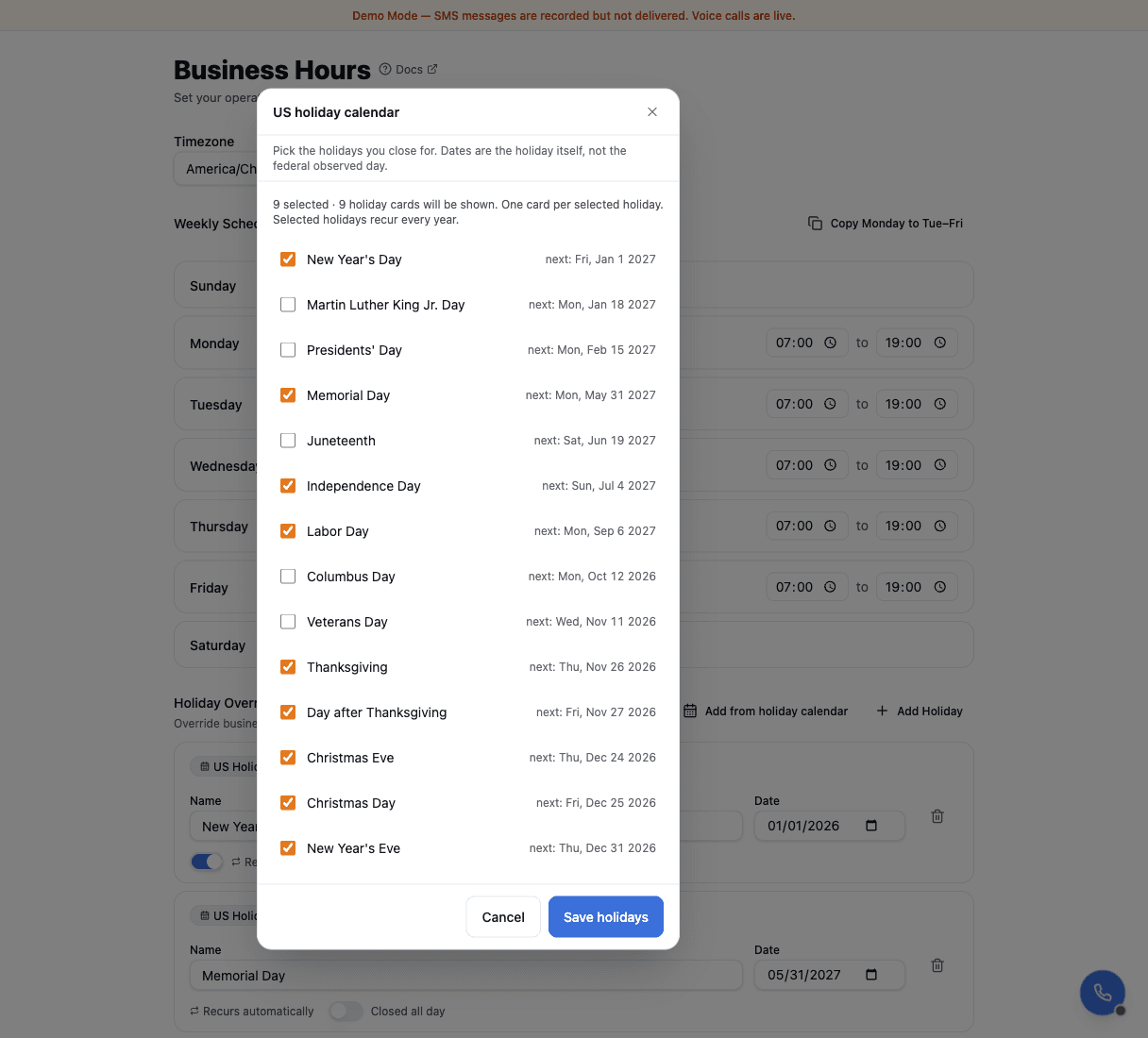
→ Full guide: Set up business hours
Give your assistant a name and a face
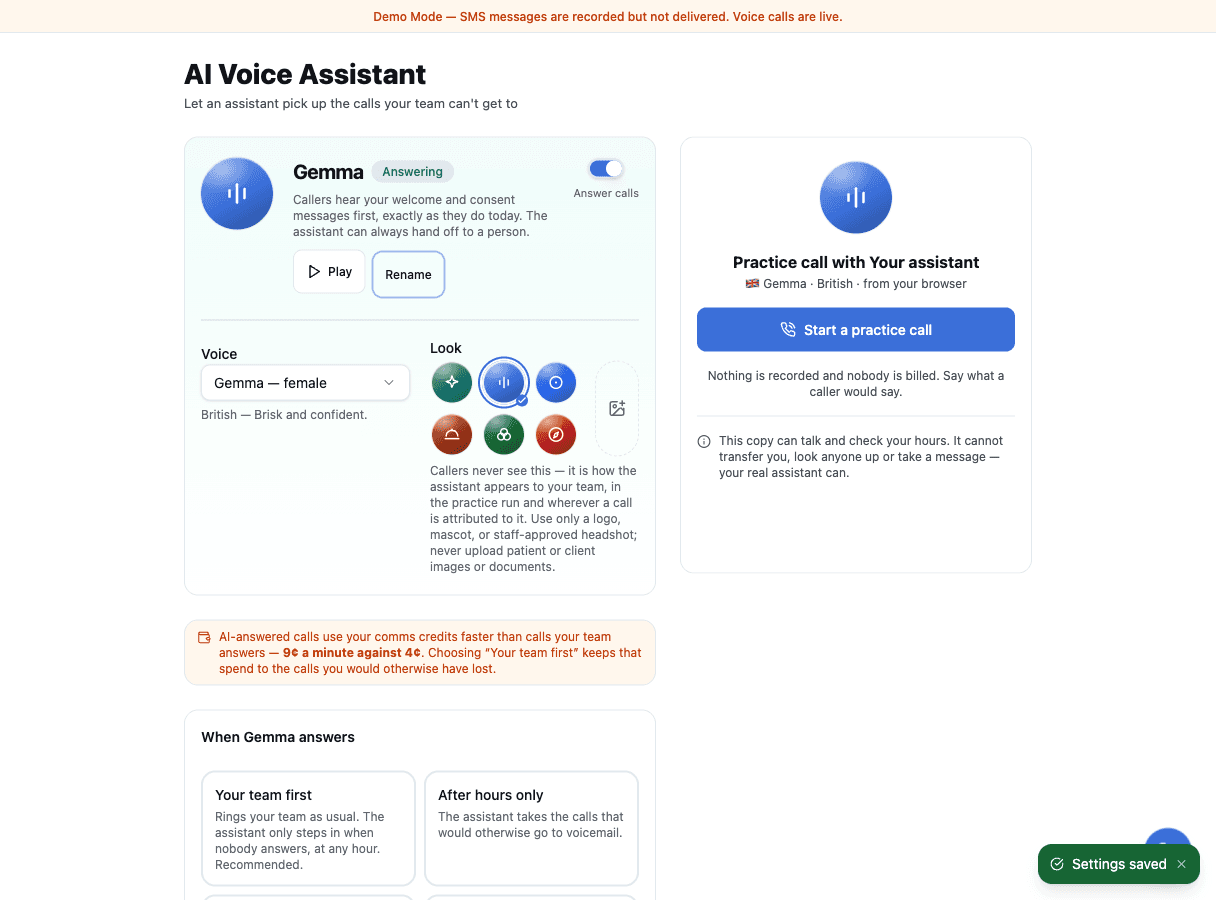
If your account has the AI assistant turned on, Phone & Routing → AI Voice Assistant now shows it as an identity card: the name your team calls it, its voice, and its look. Pick one of the built-in marks or upload a picture—a logo, a mascot, or a staff-approved headshot—and it appears wherever the assistant handled something: in the work queue, on a message thread, and in the practice call. Callers never see it. This is how the assistant appears to your team.
The practice call on that page now walks through three states—ready, live, and ended—so you can hear the assistant answer, watch what it understood, and read the summary it would have written, all before a real caller does.
Use only business identity imagery here. Do not upload patient or client photos or documents.
→ Full guide: Voice calls
Also in this release
- Clearing the Persona or Signature on Brand Voice now sticks. Before, the field emptied on screen and came back on the next visit.
- The Brand Voice page reads correctly with a screen reader: it announces the selected preset, the phrase lists have names, and clearing the persona text clears the preset it came from.
- The "unsaved changes" prompt only appears when leaving would actually lose something.
- A long hold announcement with offers no longer stretches the call-flow chart. The quote sits behind a disclosure.
Bug fixes and improvements
A further round of bug fixes and improvements to calling, transfers, and the dashboard shipped at the end of the month.
August 2026—Your phone gets answered, and your lists build themselves
Signals can now answer the phone, tell you what happened on every call it takes, give you one place that answers “what happened, and was it worth it?”, and build an audience out of what people actually did.
Build an audience from what people actually did
Tagging contacts one at a time works for a handful. For “everyone who messaged us in the last 30 days” or “everyone who never has,” describe the group instead and let Signals find them: open Manage Tags, click Build an audience, pick what the group is based on, and save it under a name you choose. It behaves like any other tag from then on—filter by it, broadcast to it, add and remove people by hand.
A saved audience is a snapshot, not a live query, so each one tells you what it was built from and how long ago: Built from “messaged in the last 30 days”, 45 days ago. Refresh re-runs it and shows you exactly what would change—how many still match, how many newly match, how many no longer do—before anything changes.
Refresh only adds people unless you select the checkbox to also remove the ones who no longer match. If you have added someone to a tag by hand, a refresh will not quietly undo that.
Tags also carry a color now, taken from the tag's own name, so a familiar one is easier to pick out of a list. The color follows the tag everywhere it appears.
→ Full guide: Organize contacts with tags
A receptionist that answers when you cannot
If your account has the voice assistant turned on, Signals answers the phone, finds out what the caller wants, takes a message, and hands them to a person when they need one. Afterwards you get a written summary of the call rather than a voicemail to sit through.
The assistant is enabled per account by your platform owner—if you do not have one, the rest of your call handling is unchanged.
Read what was actually said
Calls now carry a transcript you can read. It shows up on the task, in the conversation, and in call history, for calls the assistant handled and calls a person answered alike. Finding the one sentence that mattered no longer means replaying a recording.
Call summaries are a separate setting and start switched off—ask your platform owner to turn them on if you want them.
Read the transcript without paying extra for it
Transcription of answered calls is included in your plan—there is no per-minute charge for it. It starts switched off, and an admin or manager on your account can turn it on themselves.
→ Full guide: Read call transcripts
One page that answers "what happened, and was it worth it?"
Command Center is the new first stop. It opens on what needs attention, then what came in over the window you pick—today, yesterday, this month, last month—then what Signals handled for you across every channel, not just the phone: replies the assistant sent on text, calls it finished on its own, work that never reached a person.
Down the left is a short list you can drill into: Overview, Reports and Team. Picking one swaps what you are looking at rather than scrolling you past it, and the period you chose stays put—so comparing last month's team figures with last month's call volume is two clicks, not two pages. On a phone the same list runs across the top.
Reports and Agent Metrics live inside that drill-down now rather than in the sidebar. Both keep their old addresses, so existing links and bookmarks still work—there is just less to hunt through on the left. What you see there is the same Reports you had before, not a summary of it.
Where a number cannot be measured honestly, the page says so instead of showing a zero—a zero would claim something different from "we were not counting yet."
Signals on your phone—iPhone and Android
Both apps are live: Signals on the App Store and on Google Play. Incoming calls ring like real calls even when the app is closed, which is the thing the web app could never do reliably. See Install the mobile app.
Know which version you are on
The version and build you are running now sit at the bottom of the sidebar, and Settings → App info carries the full release history. It is the first thing support asks for, and on the mobile app there is no browser address bar to reveal it.
This announcement stays behind your lock screen
If you unlock Signals with a fingerprint, Face ID or a PIN, locking your screen leaves this announcement where it belongs—behind the lock, waiting for you.
Hear your assistant before a caller does
If your account has the voice assistant, you can now talk to it from the dashboard—no dialling your own number, no burning a real call. You speak, it answers, and the conversation appears as a transcript one line per turn while it happens. A meter shows the microphone is actually being heard, so a silent moment reads as a pause rather than a broken setup.
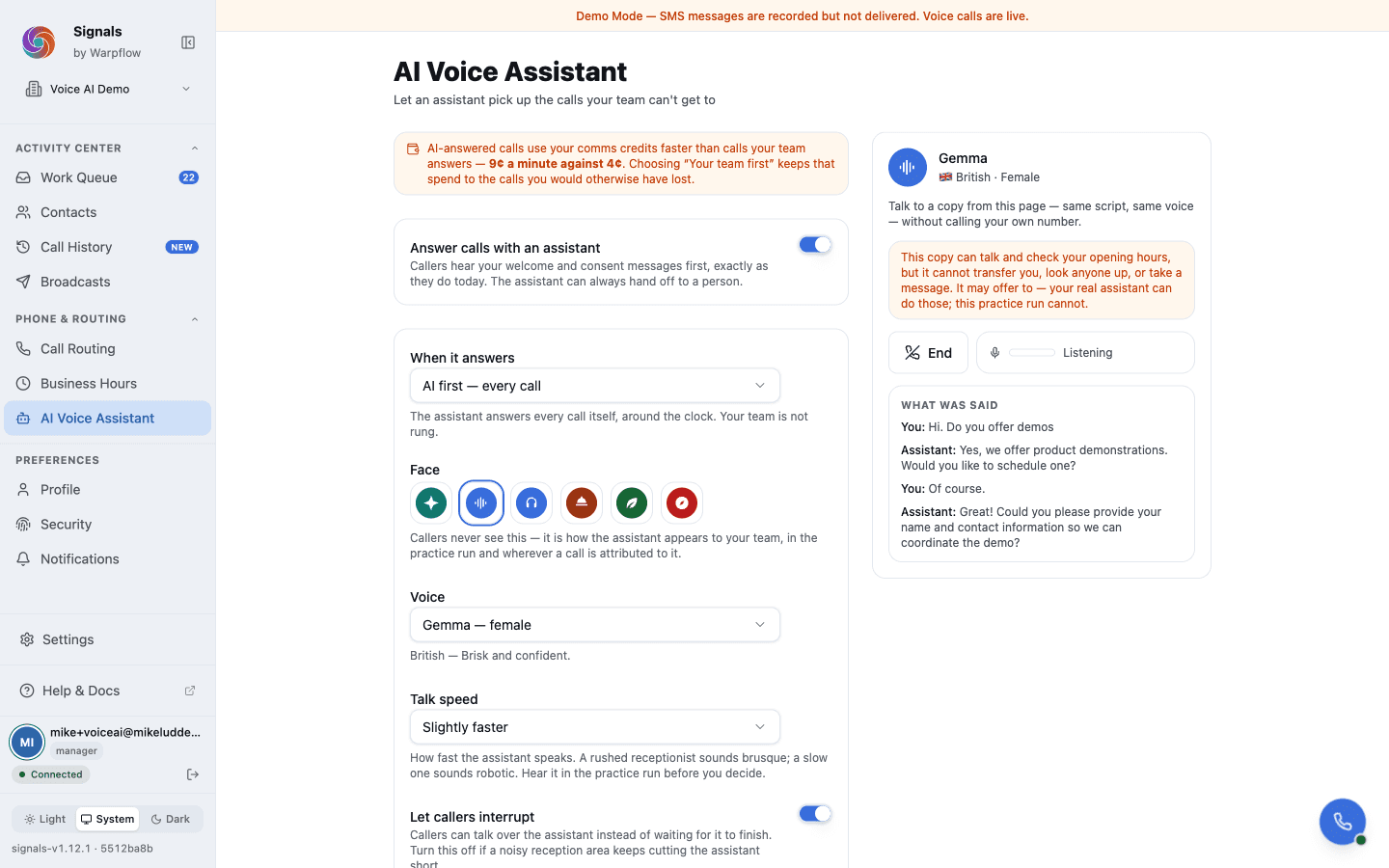
The same page is where you tune it: how fast it talks, which voice it uses, and whether it lets a caller interrupt. Changes take effect on the next call rather than the next deploy. You can also give it a name and a mark of its own, so it is recognisably yours on screen.
The rehearsal is deliberately narrower than a real call: it can look things up and answer questions, but it cannot dial a person, text anyone, or write to a contact record. Practising with it can never touch a customer.
Ask your platform owner if you do not have the voice assistant—everything else about your call handling is unchanged.
Voicemails get sorted, even without the voice assistant
Screening used to be something only the assistant could do, on a call it answered. Now, if your voicemails are transcribed and call summaries are switched on, Signals reads the transcript it already has and tells you whether a voicemail is a real prospect, a sales pitch, or something it is not sure about. The ones it is not sure about stay visible—that is the point of the "unclear" answer.
It costs nothing extra: the sorting happens inside a step that was already running.
Put a face to your team
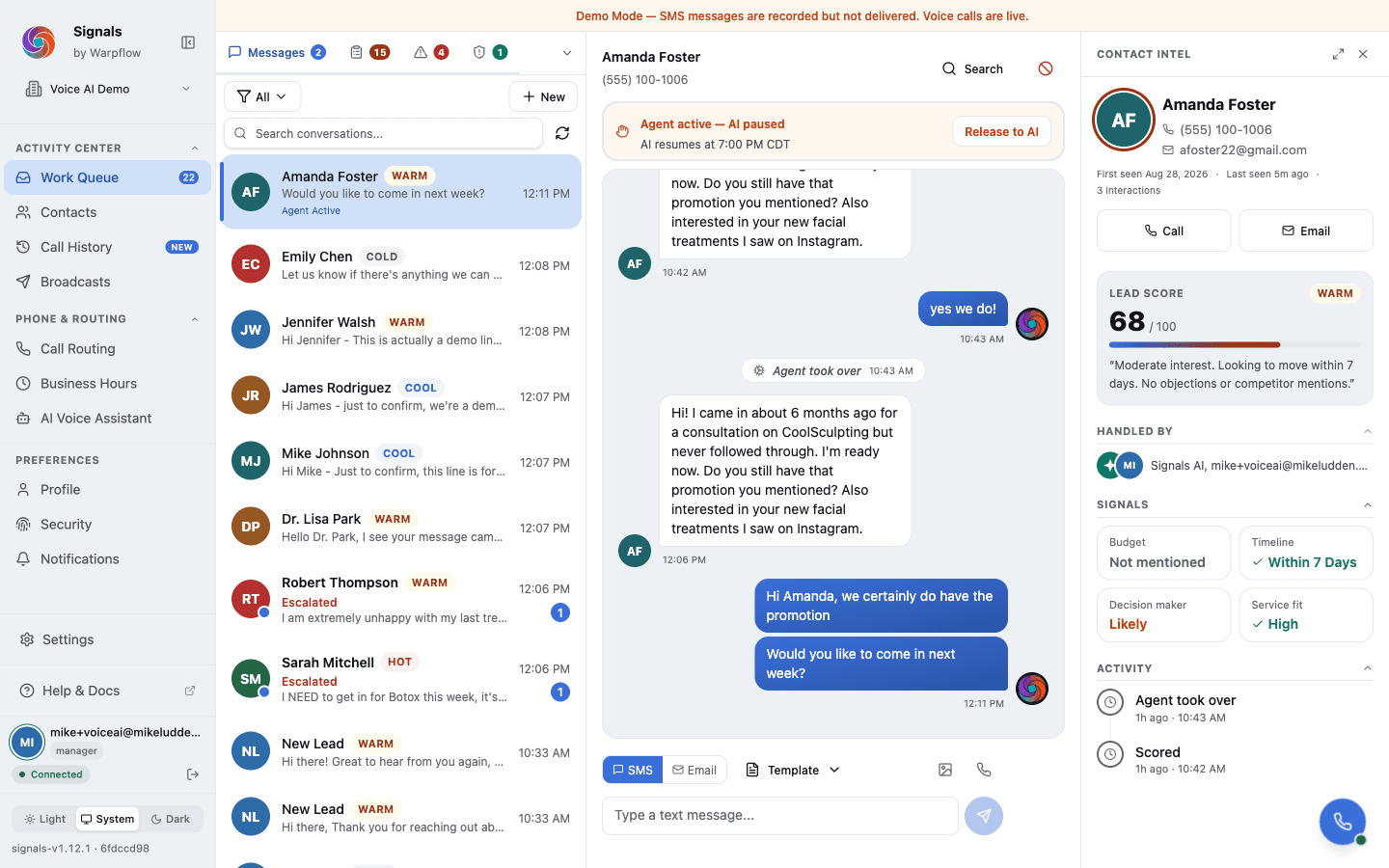
Everyone on your account can add a profile photo, and it shows up beside them in the conversation—so a handover reads as a person rather than a name. Photos are internal to your account and are never sent to a customer.
Fixed this month
- The contact panel shows the name you last saved, and clearing a name leaves the phone number in its place.
- The contact panel's edit controls are always visible on touch, so they work on a phone or tablet.
- Resolving a task on mobile takes you to the next task.
- A long transcript scrolls inside its own panel rather than running off the page.
Fixed in this release
- Save and Cancel stay put at the bottom of every dialog, however long the content is.
- Destructive buttons—Delete, Remove, Disconnect—are legible in dark mode, and each button's edge is visible against the surface behind it.
- A dialog you open from a menu returns you to where you were when you close it, in Safari, Firefox and the mobile app as well as Chrome.
July 2026—Send to your whole list
The biggest update to broadcasts since they launched, plus more room to work and better support for shared phones.
Send to your whole list
A single send can reach hundreds of recipients—up to the limit set for your account.
A large send paces itself—a few seconds between messages (faster once your number is vetted for higher throughput). That's deliberate: sending a few hundred texts in a burst is what gets a business number flagged and filtered by carriers, so Signals spaces them out to keep your number healthy. A 500-recipient send runs for roughly an hour, and it keeps going on its own the whole time—you can close the tab and come back.
A few things worth knowing:
- Nobody gets texted twice. Even if a send is interrupted and resumes, each contact is messaged at most once.
- It stops itself when it should. If your number's registration lapses, your daily carrier allowance runs out, or you run low on credits, the send pauses with a reason you can act on—and resumes once you fix the cause.
- A count means it actually sent. The "sent" number only ever counts messages that reached the carrier. A demo send is labelled as one.
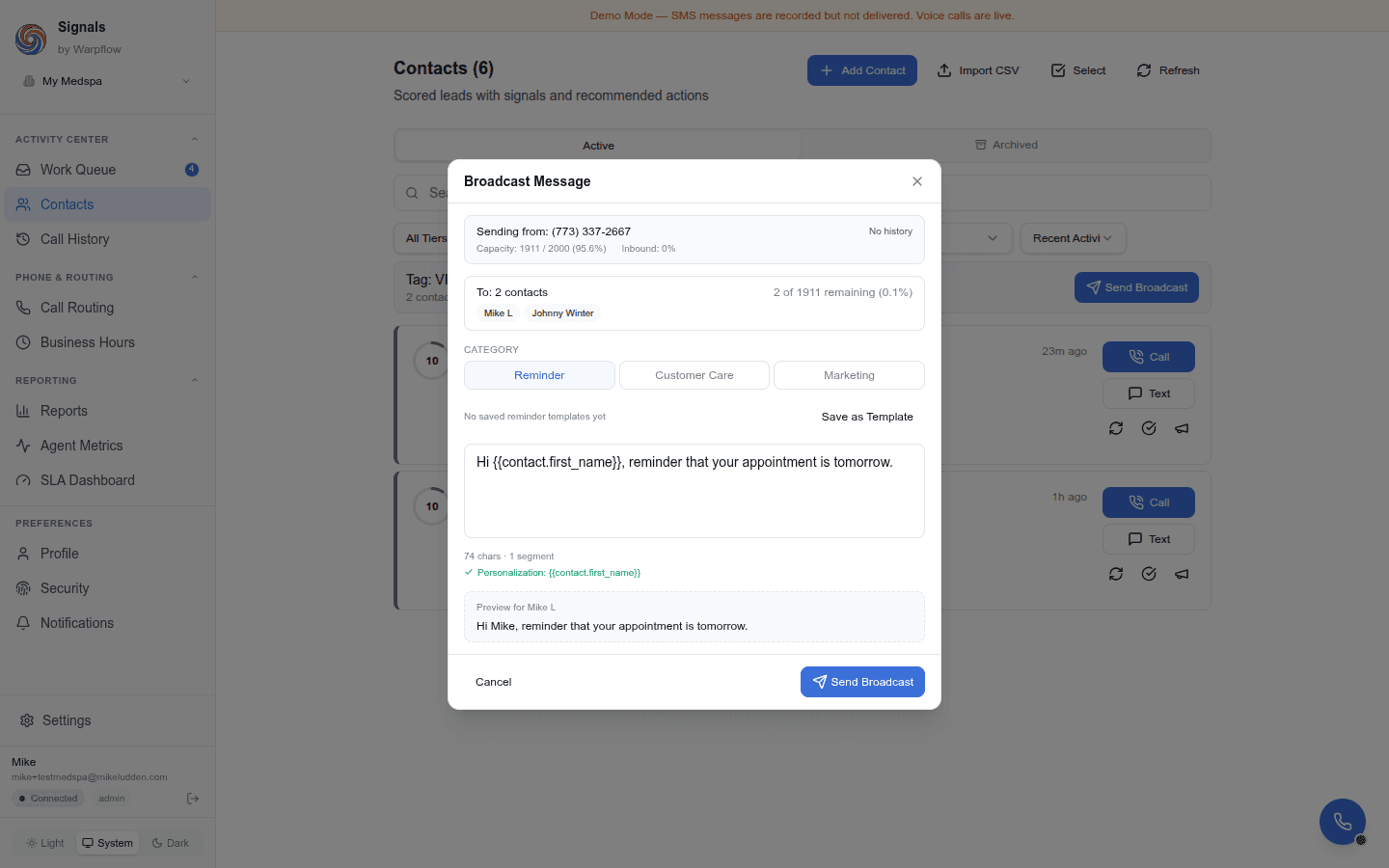
The recipient limit is set per account by your platform owner. If you need to reach a larger list than your account currently allows, ask them to raise it.
→ Full guide: Send a broadcast
More room to work
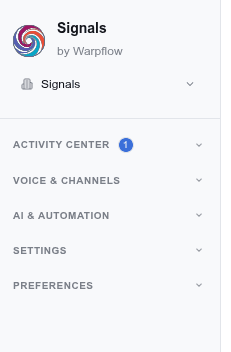
The sidebar now collapses to a slim icon rail when you want the full screen for a conversation. Hover it and it peeks back open, so every page is still one glance away—nothing is buried.
→ More: Dashboard overview
Households and shared phones
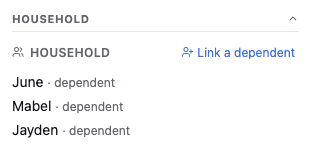
Sometimes one phone number belongs to more than one person—a parent booking for two kids, a caregiver handling messages for a relative. You can now link those people to whoever holds the phone and label who each incoming message is about, all in one thread, so your team always knows who they're really talking to.
→ Full guide: Manage households and shared phones